Forum Discussion

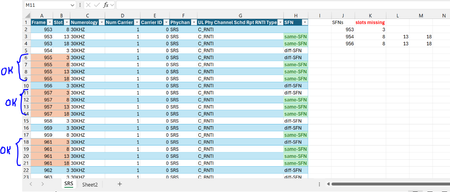
Missing slots calculation
- Feb 08, 2025
I'd suggest to add helper column to group frames, something like
=N($I1) + --([@Frame] <> $A1)Next we could GROUPBY by them
=LET(
    slots, {3,8,13,18},
    frames, GROUPBY(
        HSTACK( Table1[[#All],[Group]],Table1[[#All],[Frame]] ),
        VSTACK("Missed", Table1[Slot] ),
        LAMBDA(a, ARRAYTOTEXT( TOROW( slots / ISNA( XMATCH( slots,a ) ),2 ) ) ),
        3  ),
    dropped, DROP(frames,,1),
    FILTER( dropped, NOT( ISERROR( CHOOSECOLS(dropped,2) ) ) )
)
Performance is not very good. Perhaps we may optimize above, but don't thing that dramatically.
By the way, in Power Query version is the bug, very last frame is not calculated correctly. Since you prefer formula I didn't fix it.

I'd suggest to add helper column to group frames, something like
=N($I1) + --([@Frame] <> $A1)Next we could GROUPBY by them
=LET(
    slots, {3,8,13,18},
    frames, GROUPBY(
        HSTACK( Table1[[#All],[Group]],Table1[[#All],[Frame]] ),
        VSTACK("Missed", Table1[Slot] ),
        LAMBDA(a, ARRAYTOTEXT( TOROW( slots / ISNA( XMATCH( slots,a ) ),2 ) ) ),
        3  ),
    dropped, DROP(frames,,1),
    FILTER( dropped, NOT( ISERROR( CHOOSECOLS(dropped,2) ) ) )
)
Performance is not very good. Perhaps we may optimize above, but don't thing that dramatically.
By the way, in Power Query version is the bug, very last frame is not calculated correctly. Since you prefer formula I didn't fix it.

Hi SergeiBaklan in your LET solution ,is it possible to use something other than GROUPBY?
I don't have Groupby function in my version of Excel unfortunately.. :(
Thanks again..
Br,
Anupam
- SergeiBaklanFeb 10, 2025Diamond Contributor
As variant
=LET(
  slots, {3,8,13,18},
  Frame, Table1[Frame],
  numeration, VSTACK( 1, SCAN(1, 1*(DROP(Frame,1)<>DROP(Frame,-1)), LAMBDA(a,v,a+v) ) ),
  groups, UNIQUE(numeration),
  frames, MAP( groups, LAMBDA(g, XLOOKUP(g, numeration, Frame ) ) ),
  missed, MAP( groups, LAMBDA(g, LET(
      f, LAMBDA( FILTER(Table1[Slot], numeration = g) ),
      ARRAYTOTEXT( TOROW( slots / ISNA( XMATCH( slots, f() ) ), 2 ) )
      )
   ) ),
  both,  FILTER( HSTACK( frames, missed ), NOT( ISERROR( missed) ) ),
  VSTACK( {"Frame", "Missed"}, both  )
)
That is without helper column