Forum Discussion

TimW1725
Sep 13, 2024Copper Contributor
Missing a Variant?
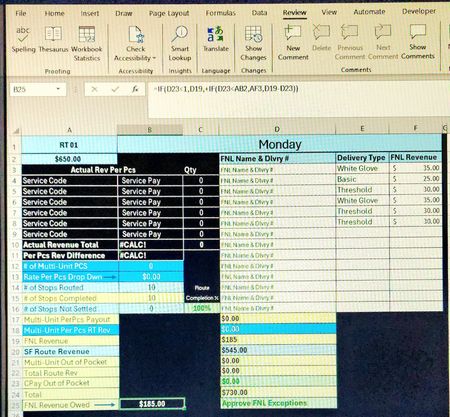
In an attempt to pay out remaining revenue owed. B25, I've created a formula that would show this (D19+D20-A2) However, I am not sure how to make it an option with the current formula in cell B25...

Riny_van_Eekelen
Sep 13, 2024Platinum Contributor
TimW1725 You need to clarify a bit. Where do D23, AB2 and AF3 come into play? I can see D23 being zero. But what about the others?
However, in general terms, if you want to make the arguments on a formula like (D19+D20-A2) conditional, based on the cells mentioned earlier, you could perhaps write something like this:
=IF( D23<1, D19 + IF( D23<AB2, AF3, D20 - A2 ), 0)
 TimW1725Sep 14, 2024Copper ContributorThanks Riny,
The suggestion returned a VALUE error.
The formulas you question relate to the [Approve FNL Exceptioms] box, if B19 is less than B20 then B19 is owed.
However let's say B20 = $525, and B19=$50,
The promised amount in A2 = $550.00, bringing the total in D24 to $575.00, this means we still owe $25.00 which should populate in B25.
However, if the amount in A2 was increased, the value would show an incorrect amount, so it to, would need to register $0.00 in this case.
Hmmmmmm I'm not sure this can be done.- Riny_van_EekelenSep 14, 2024Platinum Contributor
TimW1725 Don't think it's impossible, though don't understand what you want. Forgive my ignorance.
- TimW1725Sep 16, 2024Copper ContributorNon worries at all, thank you for assisting.