Forum Discussion

Merged Cells with XLOOKUP Help
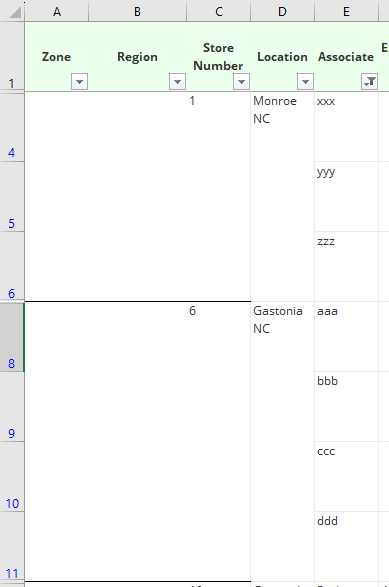

kittenmeants since you are dealing with a spreadsheet that contains thousands of rows of data with merged cells, your best option is to first clean the data using VBA....
WARNING: the following proposed solution uses VBA to modify the data in place. It is highly recommended to back up your workbook before proceeding. Please read the entire solution carefully, including all supplementary notes and important information, to determine if it's right for you. Proceed at your own risk.
(1) Open the Visual Basic editor by pressing Alt+F11 on your keyboard. If that doesn't work, it can also be opened from the Developer Tab on the ribbon. If the Developer Tab is not visible, go to File > Options > Customize Ribbon, check the box for Developer (under Customize the Ribbon > Main Tabs) and click OK.
(2) In the Visual Basic editor, go to Insert > Module and paste the following code:
Option Explicit

Sub CleanData()

'Clear filters, if necessary
    Dim ws As Worksheet
    Set ws = ActiveSheet
    If ws.FilterMode Then ws.ShowAllData

'Unmerge all cells in the target range
    Dim rg As Range
    Set rg = ws.Range("A1").CurrentRegion
    Set rg = rg.Offset(1).Resize(rg.Rows.Count - 1, 4)
    rg.Cells.UnMerge

'Load the target range into an array and fill values down
    Dim data As Variant, i As Long, j As Long
    data = rg.Value
    On Error Resume Next
    For j = LBound(data, 2) To UBound(data, 2)
        For i = LBound(data, 1) To UBound(data, 1)
            If data(i, j) = vbNullString Then data(i, j) = data(i - 1, j)
        Next i
    Next j

'Write the cleaned data back to the target range
    rg.Value = data

End Sub
(3) To run the code, go back to the worksheet, press Alt+F8 on your keyboard (or go to the Developer Tab > Macros) and click Run.
NOTE: this code assumes there are NO blank rows within the data range, and the target range to be cleaned is only the first 4 columns. Furthermore, if sub-header or sub-total rows exist within the data range, the code would need to be modified to exclude those rows.
IMPORTANT: It's always a good idea to test any new VBA code on a COPY of your workbook, in case anything should go wrong. Without seeing your entire workbook, I cannot guarantee that the code will work 100% as intended.