Forum Discussion

style3body
Aug 17, 2021Copper Contributor
Max Date formula
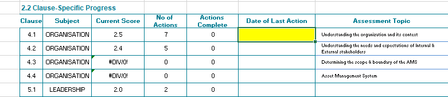
Dear All I hope you are having a great day first, I would like to thank you all for your effort the details : Device and OS platform, Windows 10 Excel product name and version number...

HansVogelaar
Aug 17, 2021MVP
Let's say the sheet with the data is named Data Sheet, and that the values 4.1 etc. are in A2:A1000, and the associated dates in B2:B1000.
On the other sheet, the values 4.1 etc. are in B2 and down, and the max dates should be displayed in G2 and down.
Enter the following formula in G2, and confirm it with Ctrl+Shift+Enter to save it as an array formula:
=MAX(IF('Data Sheet'!$A$2:$A$1000=B2,'Data Sheet'!$B$2:$B$1000))
Format G2 as a date, then fill down.