Forum Discussion

phimmychan35
Jan 03, 2024Copper Contributor
Matching help
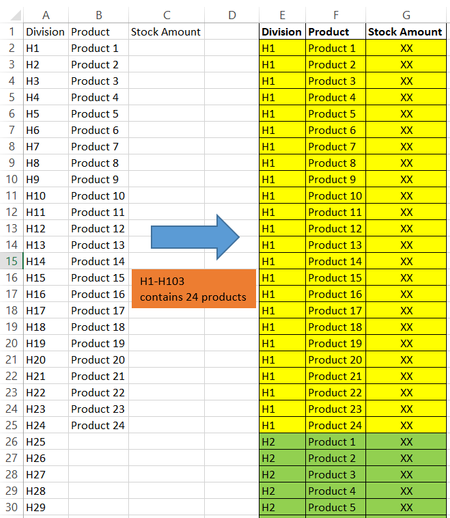
Hello. I am now manually matching divisions and products in Excel and it takes so much time and causes many errors. May anyone help with my case? 1. I have 103 division names and 24 product names...
 Jan 03, 2024
Sub division() Dim i, j, l As Long Range("E2:G1048576").Clear l = 2 For i = 2 To 104 For j = 2 To 25 Cells(l, 5).Value = Cells(i, 1).Value Cells(l, 6).Value = Cells(j, 2).Value l = l + 1 Next j Next i End SubIn the attached file you can run this macro by clicking on the button in cell I2.

phimmychan35
Jan 07, 2024Copper Contributor
Hello. Thank you once again for your help! OliverScheurich djclements
Regarding this question, could you help me with one more matter?
I have a horizontal table that stores product quantity data. The format of the table cannot be changed and the data is updated all the time. That I need another table with a vertical format. (You guys have already helped create this table.) This vertical table must pull product quantity information from the horizontal table. What formula should be used?
Note: The list of Divisions and Products may be changed, increased, or decreased.
OliverScheurich
Jan 08, 2024Gold Contributor
=LET(values,DROP(Tabelle10,,1),divisions,Tabelle10[Division],products,DROP(Tabelle10[#Headers],,1),
HSTACK(TOCOL(IF(SEQUENCE(,COLUMNS(products)),divisions))&" - "&
TOCOL(IFNA(EXPAND(products,ROWS(divisions)),products)),TOCOL(values)))
HSTACK(TOCOL(IF(SEQUENCE(,COLUMNS(products)),divisions))&" - "&
TOCOL(IFNA(EXPAND(products,ROWS(divisions)),products)),TOCOL(values)))
I've just realised that your desired output is different than what i've suggested in my last reply. The above formula should produce the intended output.