Forum Discussion

phimmychan35
Jan 03, 2024Copper Contributor
Matching help
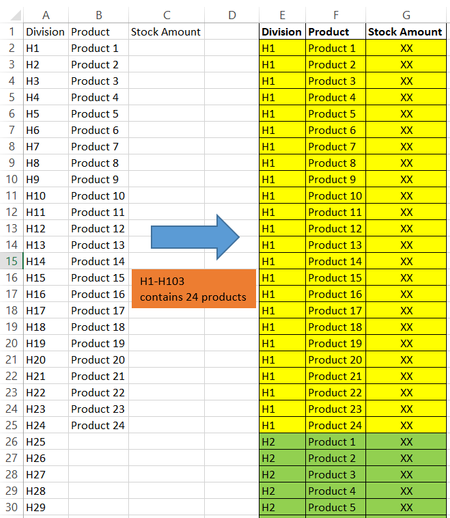
Hello. I am now manually matching divisions and products in Excel and it takes so much time and causes many errors. May anyone help with my case? 1. I have 103 division names and 24 product names...
 Jan 03, 2024
Sub division() Dim i, j, l As Long Range("E2:G1048576").Clear l = 2 For i = 2 To 104 For j = 2 To 25 Cells(l, 5).Value = Cells(i, 1).Value Cells(l, 6).Value = Cells(j, 2).Value l = l + 1 Next j Next i End SubIn the attached file you can run this macro by clicking on the button in cell I2.

djclements
Jan 03, 2024Silver Contributor
phimmychan35 If you have Excel for MS365, here's a couple of dynamic array formulas that could also work.
In cell E2, use either of the following formulas to repeat the "Divisions":
=TOCOL(IF(SEQUENCE(,24), "H"&SEQUENCE(103)))
- OR -
=TOCOL(IF(SEQUENCE(,24), A2:A104))
In cell F2, use the following formula to repeat the "Products":
=TOCOL(IF(SEQUENCE(,103), B2:B25),, TRUE)
Repeating values with SEQUENCE
 phimmychan35Jan 07, 2024Copper ContributorThank you so much. I will check this out!