Forum Discussion

KUKS_42
Apr 05, 2023Copper Contributor
Matching entries in a single row throughout several entries
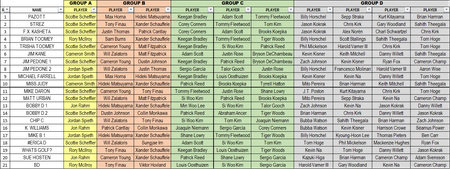
First time posting Thank You I run an office pool which has several people involved where each person has to select 10 different golfers per entry I enter everyone's selections in a single row ...
- Apr 05, 2023
If you want to indicate the rows that match visually, you could opt for conditional formatting and use COUNTIFS(). It's a bit long but it's simple and easy to understand:
=COUNTIFS($B$3:$B$24,$B3,$C$3:$C$24,$C3,$D$3:$D$24,$D3,$E$3:$E$24,$E3,$F$3:$F$24,$F3,$G$3:$G$24,$G3,$H$3:$H$24,$H3,$I$3:$I$24,$I3,$J$3:$J$24,$J3,$K$3:$K$24,$K3)>1

Patrick2788
Apr 05, 2023Silver Contributor
If you want to indicate the rows that match visually, you could opt for conditional formatting and use COUNTIFS(). It's a bit long but it's simple and easy to understand:
=COUNTIFS($B$3:$B$24,$B3,$C$3:$C$24,$C3,$D$3:$D$24,$D3,$E$3:$E$24,$E3,$F$3:$F$24,$F3,$G$3:$G$24,$G3,$H$3:$H$24,$H3,$I$3:$I$24,$I3,$J$3:$J$24,$J3,$K$3:$K$24,$K3)>1

KUKS_42
Apr 06, 2023Copper Contributor
THANK YOU! Patrick2788