Forum Discussion

kyyall
Jun 04, 2026Copper Contributor
MATCH formula anomaly?
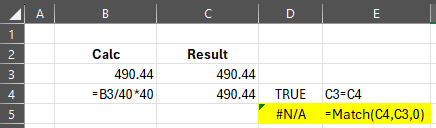
Can anyone explain this? If I simply type 490.44 and then calculate 490.44 as 490.44/40*40 (or even directly B3/40*40) excel recognizes both as equal through a simple A=B calculation yet not with a M...
 Jun 05, 2026
Hello kyyall.
That's a nice question. It's a common issue and it's a result of how computers deal with arithmetics. It's binary and therefore divisions results in new numbers with a different precision and multiplication makes the error significant. When you do a simple comparison, you get true because it's designed to ignore small differences. But using Match Formula requires to be precise and any difference in bits results in non-matched result. If you use this formula you would get the right answer: =Round(B3/40*40,2) instead of B3/40*40. I paste the picture of another example in the following:

cherkiattas
Jun 08, 2026Copper Contributor
undefined