Forum Discussion

MATCH formula anomaly?
 Jun 05, 2026
Hello kyyall.
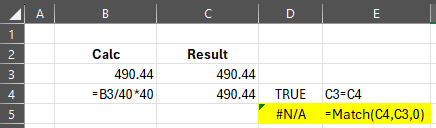
That's a nice question. It's a common issue and it's a result of how computers deal with arithmetics. It's binary and therefore divisions results in new numbers with a different precision and multiplication makes the error significant. When you do a simple comparison, you get true because it's designed to ignore small differences. But using Match Formula requires to be precise and any difference in bits results in non-matched result. If you use this formula you would get the right answer: =Round(B3/40*40,2) instead of B3/40*40. I paste the picture of another example in the following:

Google for "floating point arithmetic" to learn all about minute rounding errors that are caused by how computers deal with numbers.
When you notice something like this, use ROUND for the calculated value:
=ROUND(B3/40*40,2)Now MATCH will find the exact match you are expecting in the first element of the 'lookup array' (that only contains 1 element).