Forum Discussion

Match across sheets formula help
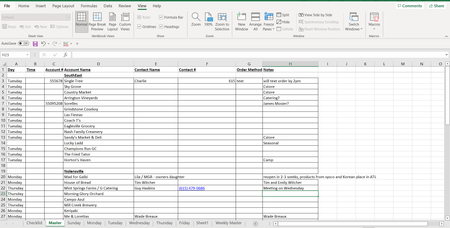

To clarify:
This is the page that will receive the data (Master), but I'd like the row information from this sheet to populate in the tab with the corresponding Text ("Sunday" goes to the "Sunday" Sheet, "Monday" goes to the "Monday" Sheet and so forth). So You'll see Master!A3 matches with "Sunday" (see 2nd screen shot) on the "Sunday" Tab, the data from Master!B3:G3 is moved to Sunday!B6:G6 because "Sunday" is the selected day. I need that for each of the tabs, synced up with the dates in Master!A3:A100.
The day tabs (Sunday:Friday) should be the landing pages for the data and correspond with the text in Master!A3:A100.

To clarify: This is the page that will receive the data (Master),
To further clarify, when you use the word "receive" does that mean that the Master sheet is where "raw data" will be first entered. That is, is it the Input sheet? i.e., ALL data entry will be to this sheet?
I'd like the row information from this sheet to populate in the tab with the corresponding Text ("Sunday" goes to the "Sunday" Sheet, "Monday" goes to the "Monday" Sheet and so forth)
Such that these daily Activity Log sheets are solely Output sheets?
If that's the case, if both of my assumptions above are correct, then it's entirely possible that the FILTER function will serve your purpose. That hyperlink takes you to a YouTube video that introduces the FILTER function and explains it very thoroughly. It does require Excel 2021 or newer (or Microsoft 365 subscription).
If you'd like further help, though, may I suggest that you post a copy of the actual workbook on OneDrive or GoogleDrive, with a link here that grants edit access to your workbook.