Forum Discussion

JohnHoego
Feb 03, 2022Copper Contributor
Make List from every column that has data corresponding to name
Hi i have a problem figuring out how to make list like this From a table like this i need a formula that can list only the job person does i have tried "vlookup" and "hlookup" but no l...
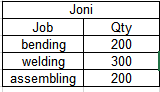
- Feb 04, 2022
For such layout
it could be
=LET(
   name, J4,
   personAmounts, XLOOKUP( name, jobs[Name],jobs[[bending]:[assembling]], ""),
   personJobs,    FILTER( jobs[[#Headers],[bending]:[assembling]], personAmounts),
  IF( {1,0}, TRANSPOSE( personJobs ), TRANSPOSE( FILTER( personAmounts, personAmounts ) ) )  )
if you are on Excel 365 or 2021

SergeiBaklan
Feb 04, 2022Diamond Contributor
For such layout
it could be
=LET(
   name, J4,
   personAmounts, XLOOKUP( name, jobs[Name],jobs[[bending]:[assembling]], ""),
   personJobs,    FILTER( jobs[[#Headers],[bending]:[assembling]], personAmounts),
  IF( {1,0}, TRANSPOSE( personJobs ), TRANSPOSE( FILTER( personAmounts, personAmounts ) ) )  )
if you are on Excel 365 or 2021

JohnHoego
Feb 07, 2022Copper Contributor
thankyou so much for this!
- SergeiBaklanFeb 07, 2022Diamond Contributor
JohnHoego , you are welcome
- JohnHoegoFeb 10, 2022Copper Contributorcan you explain more about the IF({1,0}) parts? i've been trying to add a third column with a different value but it seems the value always the same for 1- infinity
- SergeiBaklanFeb 10, 2022Diamond Contributor
For more than 2 columns it's better to use something like
function iterates condition array and returns selected value (which is actually array or column) on correspondent position. It could be modified as needed, for example
IF() may return only two values / columns (if true and if false), but from these two you may combine as many columns as needed
You have no way to add here one more column, only combine C3:C7 and E3:E7 as desired.