Forum Discussion

bartvana
Sep 24, 2021Iron Contributor
Mailing list from Power Pivot
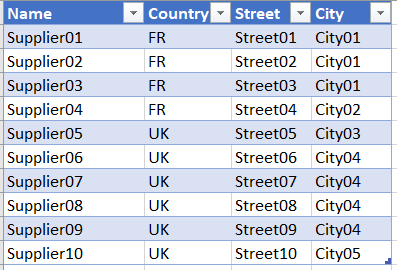
I have 3 tables: a dimension table with suppliers, a dimension table with SKU's, a fact table of purchase orders. (See simplified data below and in attached workbook). tSuppliers: tSKUs...
- Sep 25, 2021
As a comment, that's a best practice to hide fields on "many" side of relationship and don't use them in reports.
Slightly modified Riny_van_Eekelen solution, you may use measures
Total SKUs:=CALCULATE( COUNTROWS( tPOs ), CROSSFILTER( tSKUs[SKU], tPOs[SKU], Both ) )

SKUs:=CALCULATE( CONCATENATEX(tSKUs, tSKUs[SKU], ", "), CROSSFILTER( tSKUs[SKU], tPOs[SKU], Both ) )
to have PivotTable in bit different form


Riny_van_Eekelen
Sep 24, 2021Platinum Contributor
bartvana Perhaps the attached file helps.

bartvana
Sep 25, 2021Iron Contributor
Riny_van_Eekelen So actually the Stockvalue filter was already working, right? I misinterpreted the data, I see now.
If I'm correct, you tweaked the PivotTable with the Design options? Or did you do something else too?
- Riny_van_EekelenSep 25, 2021Platinum Contributor
bartvana Didn't tweak much more than choosing a tabular layout. Other than that, I also changed the selection of fields (Row, Column and Value) as you can see in the pivot table fields window.