Forum Discussion

LOOKUP to XLOOKUP Migration
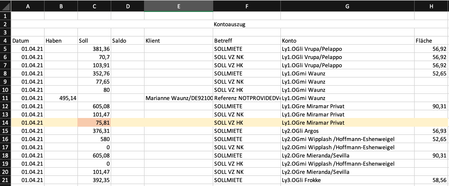
- Apr 17, 2021
I'd try to use dynamic ranges instead like
=LOOKUP(2,1/
    (Konten!$A$1:INDEX(Konten!$A:$A, COUNTA(Konten!$A:$A))>=$EJ$3)/
    (Konten!$G$1:INDEX(Konten!$G:$G, COUNTA(Konten!$A:$A))=$GD4)/
    (Konten!$F$1:INDEX(Konten!$F:$F, COUNTA(Konten!$A:$A))="SOLL VZ HK"),
    (Konten!$C$1:INDEX(Konten!$C:$C, COUNTA(Konten!$A:$A)))
)
or, to simplify a bit
=LET(n, COUNTA(Konten!$A:$A),
LOOKUP(2,1/
    (Konten!$A$1:INDEX(Konten!$A:$A, n ) >= $EJ$3)/
    (Konten!$G$1:INDEX(Konten!$G:$G, n ) =  $GD4)/
    (Konten!$F$1:INDEX(Konten!$F:$F, n ) =  "SOLL VZ HK"),
    (Konten!$C$1:INDEX(Konten!$C:$C, n ))
)
Even better if you convert your range into structured table.
In general I'm not sure that XLOOKUP is faster than LOOKUP. In any case, since you have mix of exact and approximate criteria, I guess XLOOKUP shall be used the same way
=LET(n, COUNTA(Konten!$A:$A),
XLOOKUP(1,1/
    (Konten!$A$1:INDEX(Konten!$A:$A, n ) >= $EJ$3)/
    (Konten!$G$1:INDEX(Konten!$G:$G, n ) =  $GD4)/
    (Konten!$F$1:INDEX(Konten!$F:$F, n ) =  "SOLL VZ HK"),
    (Konten!$C$1:INDEX(Konten!$C:$C, n ))
)
As for the second formula, in example second XLOOKUP returns reference on the column (see third parameter). In your formula
=XLOOKUP(Tabelle1!EJ3;
   Konten!A:A;
   XVERWEIS(Tabelle1!GD3;
            Konten!G:G;
            XVERWEIS("SOLL VZ HK";
                     Konten!F:F;
                     Konten!C:C)
))
nested XLOOKUP returns reference on the cell where array is expected.

I'd try to use dynamic ranges instead like
=LOOKUP(2,1/
    (Konten!$A$1:INDEX(Konten!$A:$A, COUNTA(Konten!$A:$A))>=$EJ$3)/
    (Konten!$G$1:INDEX(Konten!$G:$G, COUNTA(Konten!$A:$A))=$GD4)/
    (Konten!$F$1:INDEX(Konten!$F:$F, COUNTA(Konten!$A:$A))="SOLL VZ HK"),
    (Konten!$C$1:INDEX(Konten!$C:$C, COUNTA(Konten!$A:$A)))
)
or, to simplify a bit
=LET(n, COUNTA(Konten!$A:$A),
LOOKUP(2,1/
    (Konten!$A$1:INDEX(Konten!$A:$A, n ) >= $EJ$3)/
    (Konten!$G$1:INDEX(Konten!$G:$G, n ) =  $GD4)/
    (Konten!$F$1:INDEX(Konten!$F:$F, n ) =  "SOLL VZ HK"),
    (Konten!$C$1:INDEX(Konten!$C:$C, n ))
)
Even better if you convert your range into structured table.
In general I'm not sure that XLOOKUP is faster than LOOKUP. In any case, since you have mix of exact and approximate criteria, I guess XLOOKUP shall be used the same way
=LET(n, COUNTA(Konten!$A:$A),
XLOOKUP(1,1/
    (Konten!$A$1:INDEX(Konten!$A:$A, n ) >= $EJ$3)/
    (Konten!$G$1:INDEX(Konten!$G:$G, n ) =  $GD4)/
    (Konten!$F$1:INDEX(Konten!$F:$F, n ) =  "SOLL VZ HK"),
    (Konten!$C$1:INDEX(Konten!$C:$C, n ))
)
As for the second formula, in example second XLOOKUP returns reference on the column (see third parameter). In your formula
=XLOOKUP(Tabelle1!EJ3;
   Konten!A:A;
   XVERWEIS(Tabelle1!GD3;
            Konten!G:G;
            XVERWEIS("SOLL VZ HK";
                     Konten!F:F;
                     Konten!C:C)
))
nested XLOOKUP returns reference on the cell where array is expected.

SergeiBaklan Thank you very much Sergei!!!
I converted the table into a structured table and was able to implement your suggestion with some slight changes / help from https://support.microsoft.com/en-us/office/using-structured-references-with-excel-tables-f5ed2452-2337-4f71-bed3-c8ae6d2b276e . It goes:
=LET(n; (COUNTA(Tabelle1[Datum]));
XLOOKUP(1;1/
(Tabelle1[[#Headers];[Datum]]:INDEX(Tabelle1[Datum]; n) >= [@DatumAnschreiben])/
(Tabelle1[[#Headers];[Konto]]:INDEX(Tabelle1[Konto]; n) = [@NameKonto])/
(Tabelle1[[#Headers];[Betreff]]:INDEX(Tabelle1[Betreff]; n) = "SOLL VZ NK");
(Tabelle1[[#Headers];[Betrag]]:INDEX(Tabelle1[Betrag]; n))))
Weirdly, I couldn't select the cells with the mouse, I had to type it.
The calculation is a bit faster, I'd say by 20%. But I also did some other simplifications, so it is hard to say...
Greetings from the Morsum, Island of Sylt, Germany!!
- SergeiBaklanApr 18, 2021Diamond Contributor
If you convereted range to table same formula will be much simplier:
XLOOKUP(1;1/
  (Tabelle1[Datum] >= [@DatumAnschreiben])/
  (Tabelle1[Konto] = [@NameKonto])/
  (Tabelle1[Betreff] = "SOLL VZ NK");
  (Tabelle1[Betrag])
)
And I'd try instead
INDEX(FILTER(Tabelle1[Betrag];
  (Tabelle1[Datum]   >= [@DatumAnschreiben])*
  (Tabelle1[Konto]   = [@NameKonto])*
  (Tabelle1[Betreff] = "SOLL VZ NK")
);1)
perhaps it gives better result. INDEX() here is to return first element if FILTER() finds more than one which meets criteria.
- PeterBartholomew1Apr 18, 2021Silver Contributor
@(FILTER(Tabelle1[Betrag];
  (Tabelle1[Datum]   >= [@DatumAnschreiben])*
  (Tabelle1[Konto]   = [@NameKonto])*
  (Tabelle1[Betreff] = "SOLL VZ NK")
 )
should do the same job, but perhaps that is a little too cryptic?
- SergeiBaklanApr 19, 2021Diamond Contributor
Exactly, but I do not rely on "@" and prefer to use straightforward INDEX().
Back to XLOOKUP(), copy/pasting from LOOKUP() I forgot to remove division, this variant
XLOOKUP(1;
  (Tabelle1[Datum] >= [@DatumAnschreiben])*
  (Tabelle1[Konto] = [@NameKonto])*
  (Tabelle1[Betreff] = "SOLL VZ NK");
  (Tabelle1[Betrag])
)
It does the same job as FILTER() but I'm not sure if any difference from performance point of view.


