Forum Discussion

sbennett2345
Sep 30, 2025Copper Contributor
Lookup help with 2 or more variables
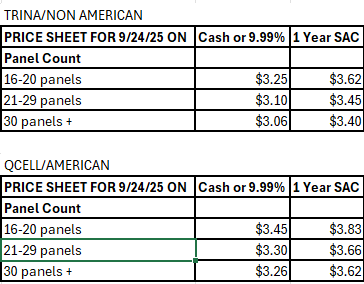
I am trying to create sort of a calculator where the user will choose 3 variables form dropdowns to return a price. The chart below is the information that they would provide and the result they shou...

Lorenzo
Sep 30, 2025Silver Contributor
(Duplicate of Formula help multiple value lookup)
sbennett2345
Excel version not specified. Assumed 365 with TRIMRANGE
Other assumptions according to your pic.:
- A row with "Panel count" always exist before rows with "nn panels"
- The "nn panels" rows always start with 2 digits (16, 21, 30)
- Each block of data (TRINA, QCELL...) always consist of 6 rows
- Cells G4:G6 respectively named Criteria1, Criteria2 and Criteria3
- Drop down (Data Validation) items for Criteria1 to spill in an Helper Sheet. Formula is (adjust Sheet1! if necessary):
=LET(
  trimmed_range, TRIMRANGE( Sheet1!B:B ),
  row_PanelCount, (trimmed_range = "panel count") * SEQUENCE( ROWS( trimmed_range ) ),
  SORT( CHOOSEROWS( trimmed_range, FILTER( row_PanelCount, row_PanelCount ) -2 ) )
)
Formula for Result in G8:
=LET(
  trimmed_range, TRIMRANGE(B:D),
  row_criteria1, XMATCH( Criteria1, CHOOSECOLS( trimmed_range, 1 ) ),
  target_data, TAKE( DROP( trimmed_range, row_criteria1 +2 ), 3 ),
  result, INDEX( target_data,
            XMATCH( Criteria2, VALUE( LEFT( CHOOSECOLS( target_data, 1 ), 2 ) ), -1 ),
            XMATCH( TRUE, ISNUMBER( SEARCH( Criteria3, CHOOSEROWS( trimmed_range, row_criteria1 +1 ) ) ) )
          ),
  IF( COUNTA( Criteria1, Criteria2, Criteria3 ) = 3, result, "")
)
Corresponding workbook avail. here