Forum Discussion

agags333
Nov 26, 2023Copper Contributor
Lookup across spreadsheet- Random Locations for Headings
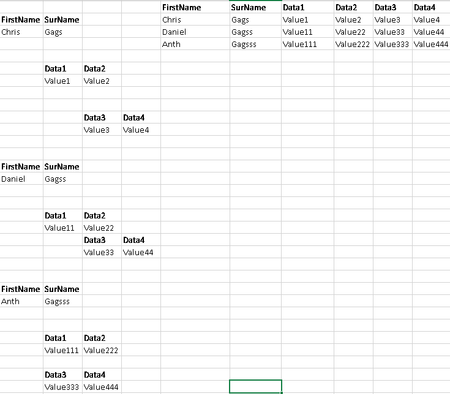
Hoping there is a way to lookup the Firstname, Surname, Data1, Data2 and populate the list as shown below- This is a spit out from a database and as such the data can be randomly plotted on the outpu...
- Nov 28, 2023
Another approach. It's set to handle data like in the example but could be adjusted as needed.
'ReShape
=LAMBDA(matrix,LET(
    header, {"First Name", "Last Name", "Data1", "Data2", "Data3", "Data4"},
    BinVector, TOCOL(
        N((matrix <> "") * (LEFT(matrix, 4) <> "Data") * (RIGHT(matrix, 4) <> "Name"))
    ),
    seq, SEQUENCE(ROWS(BinVector)),
    r, WRAPROWS(FILTER(seq, BinVector <> 0), 6),
    reshaped, INDEX(TOCOL(matrix), r),
    VSTACK(header, reshaped)
))


djclements
Nov 26, 2023Silver Contributor
agags333 If you have Excel for MS365, you could try TOROW with WRAPROWS to arrange the data in a table, then use a combination of CHOOSECOLS with VSTACK to return the desired output:
=LET(
   arr, WRAPROWS(TOROW(A1:D30, 1), 12),
   VSTACK(
      TAKE(CHOOSECOLS(arr, 1, 2, 5, 6, 9, 10), 1),
      CHOOSECOLS(arr, 3, 4, 7, 8, 11, 12)
   )
)
Note: this will only work if there are always 6 data fields plus headers (for a total of 12 cells containing values) per person, and all of the other cells within the range are blank, as shown in your sample screenshot.
MS365 Solution with Dynamic Array Functions