Forum Discussion

newtonlewillows
Oct 03, 2020Copper Contributor
Looking to use unique identifier to fill out remaining entries
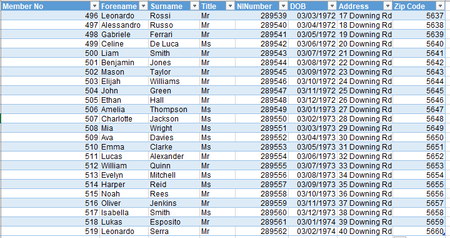
I have these two workbooks. Previously I have used INDEX / MATCH (5x times) to get the desired effect that I want, is there a specific set of formulas which I can use to get multiple val...

newtonlewillows
Oct 03, 2020Copper Contributor
INDEX/MATCH does work, but I have to do it 5 times for each column, is there are way of doing this only once?

SergeiBaklan
Oct 03, 2020Diamond Contributor
Afraid I didn't catch, copy/paste formula to another 5 columns is just few seconds second.
I assume formula is like
=INDEX(Table1[[Forename]:[Zip Code]],
  MATCH(Table2[@[MemberNo]:[MemberNo]],Table1[[MemberNo]:[MemberNo]],0),
  COLUMN()-COLUMN(Table2[[#Headers],[MemberNo]]) )
another columns are empty at the beginning, then with copy/paste they shall be filled (don't drag)