Forum Discussion

newtonlewillows
Oct 03, 2020Copper Contributor
Looking to use unique identifier to fill out remaining entries
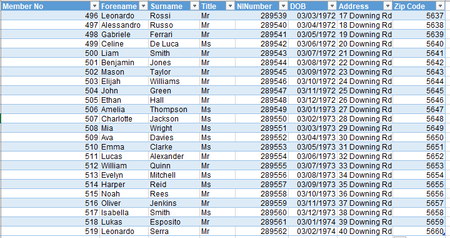
I have these two workbooks. Previously I have used INDEX / MATCH (5x times) to get the desired effect that I want, is there a specific set of formulas which I can use to get multiple val...

SergeiBaklan
Oct 03, 2020Diamond Contributor
I guess you need to fill data into the 5 columns to the right of each ID. Not sure why INDEX/MATCH or similar doesn't work - formula will be populate within the column automatically and with proper designed formula you only need to drag it to the right to fill other columns.

newtonlewillows
Oct 03, 2020Copper Contributor
INDEX/MATCH does work, but I have to do it 5 times for each column, is there are way of doing this only once?
- SergeiBaklanOct 03, 2020Diamond Contributor
Afraid I didn't catch, copy/paste formula to another 5 columns is just few seconds second.
I assume formula is like
=INDEX(Table1[[Forename]:[Zip Code]],
  MATCH(Table2[@[MemberNo]:[MemberNo]],Table1[[MemberNo]:[MemberNo]],0),
  COLUMN()-COLUMN(Table2[[#Headers],[MemberNo]]) )
another columns are empty at the beginning, then with copy/paste they shall be filled (don't drag)