Forum Discussion

Looking to use table data to influence formatting of cells on separate tables.

You've had 70 views (and counting) with zero replies. I doubt if anybody could help without seeing the actual workbook. Is it possible for you to post that on OneDrive or GoogleDrive, pasting also a link here that grants access?
I suspect also that a more complete description of what you're seeking to achieve will be needed.

mathetes I have updated the post to contain the file, which also has a more direct description/ directions of the goal i would like to attain.
Thanks
- mathetesMay 11, 2024Gold ContributorAs Hans has written, you need to post a link that grants access. This one says we need to request access, so it's incomplete.
- DamascusOneMay 12, 2024Copper ContributorPermissions have been updated
- mathetesMay 12, 2024Gold Contributor
See if this is doing what you want. It's frankly not clear what you're doing and why. I took my lead from this portion of your original post.
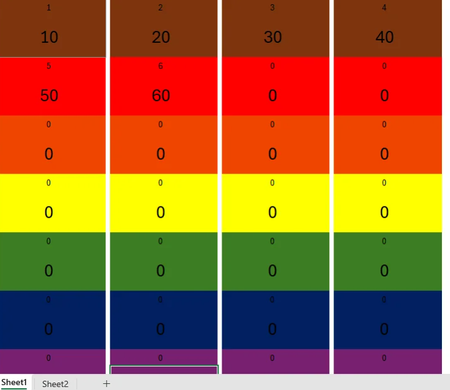
My current formula reads as followed:
=AND(NOT(ISBLANK(A1)),INDEX(Sheet2!$E$2:$E$100,INT(ROW(A1)+1)/2)="brn")
Which is very close to working however, I would like the formula to only colour A1 and A2, on Sheet 1( as seen below), brown instead of the entire row
I will say that Conditional Formatting is often elusive, requiring a lot of trial and error. Since you were close to what you wanted to begin with, I'd encourage you to just keep playing. All I changed were the cells to which the conditional formatting was to be applied.
- HansVogelaarMay 11, 2024MVP
Your link requires signing in...
