Forum Discussion

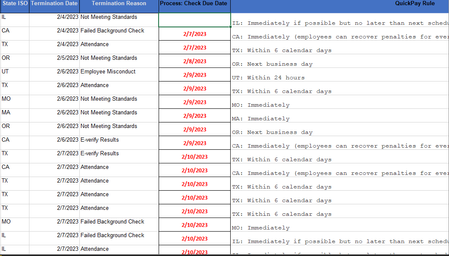
looking for help with an Excel function

IF(A2="TX",DATE(YEAR(B2),MONTH(B2),DAY(B2)+6),"")

If you want to apply the same formula for multiple states (make states for Coditions :), you can use the OR function inside the IF function. The OR function returns TRUE if any of the arguments is TRUE, and FALSE if all of the arguments are FALSE.
For example, if you want to add 6 days to the date in column B if the state in column A is TX, CA, NY or FL, you can use this formula:
=IF(OR(A2="TX",A2="CA",A2="NY",A2="FL"),DATE(YEAR(B2),MONTH(B2),DAY(B2)+6),"")
This formula will check if A2 is equal to any of the four states, and if so, it will return the date in B2 plus 6 days. Otherwise, it will return an empty string.
You can add more states (conditions 🙂 to the OR function by separating them with commas. For example, if you want to include 18 states (conditions), you can use something like this:
=IF(OR(A2="TX",A2="CA",A2="NY",A2="FL",A2="WA",A2="OR",A2="NV",A2="AZ",A2="CO",A2="NM",A2="UT",A2="ID",A2="MT",A2="WY",A2="ND",A2="SD",A2="NE",A2="KS"),DATE(YEAR(B2),MONTH(B2),DAY(B2)+6),"")
Hope I could help.
I know I don't know anything (Socrates)
- KionTimmsMar 24, 2023Copper ContributorThank you so much!! you have no idea. This was the last piece I needed.
Cheers!!!!