Forum Discussion

Looking for help on a code
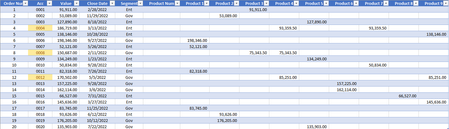
- May 04, 2023
In F2:
=INDEX(Table2[[#Headers],[Product 1]:[Product 9]],MATCH(9.99999999999999E+307,Table2[@[Product 1]:[Product 9]]))
Alternatively, to return all products in a single cell:
=TEXTJOIN(", ",TRUE,FILTER(Table2[[#Headers],[Product 1]:[Product 9]],Table2[@[Product 1]:[Product 9]]<>""))


Hello there! I understand that you're looking for help with a code to process a product dataset that is structured in a unique way. From what I gather, you have multiple columns representing different products, and each order has a value in one of those product columns indicating the product sold for that order.
To accomplish your goal, you want to write a code that scans the columns from left to right and identifies the first non-empty value. Then, you'd like to extract the column name and place it in the "Product Num" column.
I reviewed the information you provided and noticed that you included a link to a Google Sheets document containing the dataset. Unfortunately, as a Microsoft expert, I'm unable to access external links directly. However, I'd be more than happy to assist you with the code implementation itself.
Based on your description, it sounds like you'll need to iterate over the columns and identify the first non-empty cell for each row.
Here's a sample code snippet in Python that demonstrates how you can achieve this using the pandas library:
```python
import pandas as pd
# Load the dataset from the Google Sheets link
url = 'https://docs.google.com/spreadsheets/d/1b1MO8k2ULq0mObUzaY42UtS731Q83WFD/export?format=csv'
df = pd.read_csv(url)
# Iterate over each row
for index, row in df.iterrows():
for column in df.columns:
if pd.notnull(row[column]):
# Found a non-empty cell, extract the column name and update 'Product Num'
df.at[index, 'Product Num'] = column
break
# Print the updated dataset
print(df)
```
This code assumes you have the pandas library installed. It loads the dataset from the provided Google Sheets link, iterates over each row, and searches for the first non-empty cell in each row's columns. Once found, it updates the "Product Num" column with the corresponding column name.
Please give it a try and let me know if you encounter any issues or have further questions. I'm here to assist you!
Regards,