Forum Discussion

JoMoWasHere
Sep 05, 2023Copper Contributor
Long IF formula to addon if more than 24 months, then TRUE is "Aged"
Hi, Currently working on an excel formula to eventually put up on SharePoint. Unfortunately, SharePoint only provides me with 1 line for an excel formula and I'm trying to automate, in a sense, a...

JoMoWasHere
Sep 06, 2023Copper Contributor
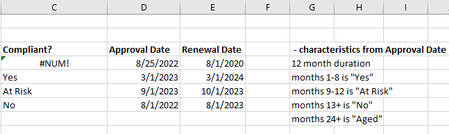
No need to apologize at all, I should be the one doing that. Especially considering I've kind of been confusing mathetes about my organization. I have done that, but now the At Risk and Yes true values are showing a #NUM error.

SergeiBaklan
Sep 06, 2023Diamond Contributor
So, actually we don't care about Renewal Date, we check how many months today since Approval Date and return notification depends on that. If so that could be
=IF( TODAY() <= EDATE(D4, 8), "Yes",
 IF( TODAY() <= EDATE(D4, 12), "At Risk",
 IF( TODAY() <  EDATE(D4, 24), "No", "Aged"  ) ) )
or, in SharePoint notation which doesn't support EDATE
=IF( TODAY() <= DATE(YEAR(D4),MONTH(D4)+8,DAY(D4)), "Yes",
 IF( TODAY() <= DATE(YEAR(D4),MONTH(D4)+12,DAY(D4)), "At Risk",
 IF( TODAY() <  DATE(YEAR(D4),MONTH(D4)+24,DAY(D4)), "No", "Aged"  ) ) )
With that logic I didn't catch initial sample with At Risk on next date after Approval Date.
Or we have to ignore Approval Date and calculate only how many months are from today to Renewal Date or after that. IMHO, when it looks like the logic shall be different. If today we are at 2 months after Renewal Date, is that "Aged" or what? Or it could be one more logic if the take into account all three - Approval Date, Renewal Date and TODAY. Have no idea which one.