Forum Discussion

AJKSolutions
Feb 22, 2024Copper Contributor
Link a currency amount to a calandar spreadsheet by date.
I have a budget calander spreadsheet, it has a different sheet for each month, in each sheet there is a different column for each week in the month. I am trying to create a separate sheet where ...
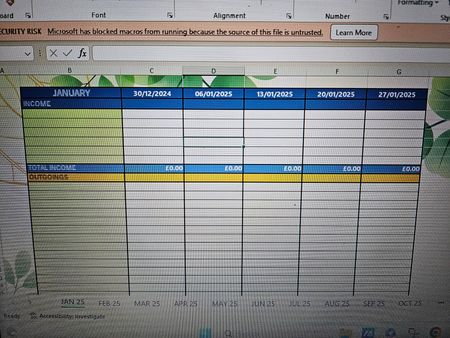

smylbugti222gmailcom
Feb 23, 2024Iron Contributor
I've analyzed the image and information you've provided, and here's a solution to link a currency amount to a calendar spreadsheet by date:
Steps:
Create a Data Table:
- In the separate sheet (let's call it "Debits"), create a table with two columns:
- Column A: "Date" (formatted as Date)
- Column B: "Amount" (formatted as Currency)
- In the separate sheet (let's call it "Debits"), create a table with two columns:
Use the SUMIFS Function:
- In your calendar sheet, for each week's column, add a formula using SUMIFS to aggregate the debit amounts for that week.
- For example, in the "Week 1" column of the "January" sheet, the formula would be:Excel
=SUMIFS(Debits!B:B, Debits!A:A, ">=DATE(" & YEAR(C$2) & ", " & MONTH(C$2) & ", " & C2 & ")")
=SUMIFS(Debits!$B:$B, Debits!$A:$A, ">=DATE(" & YEAR($C$2) & ", " & MONTH($C$2) & ", " & $C2 & ")")
- Replace C2 with the cell containing the week's starting date in your calendar sheet.
- This formula dynamically calculates the sum of debit amounts from the "Debits" sheet based on the date range of the week (from the starting date in C2).
- Adjust the formula and date references as needed for other week columns and months.
Additional Tips:
- Format Cells: Ensure consistent formatting for dates and currencies across sheets.
- Absolute References: Use absolute references ($C$2) for the date cell in the SUMIFS formula to maintain the week range across months.
- Conditional Formatting: Consider applying conditional formatting to highlight cells with debit amounts, making it easier to visualize expenses.
- Error Handling: If there are no debit amounts for a particular week, the SUMIFS formula will return 0. You can add an IFERROR function to handle this, e.g., =IFERROR(SUMIFS(...), 0).
Remember to adjust cell references and formatting to match your specific spreadsheet layout. With this approach, you should be able to automatically link debit amounts to their corresponding weeks in the calendar spreadsheet.

AJKSolutions
Mar 01, 2024Copper Contributor
Thank you for your help!
Is not quite what I'm after, but thank you for your suggestion. Believe what I am after maybe more complicated than I first thought, so may lean towards some consultancy on this occasion.
Thanks again!
AK