Forum Discussion

Link 2 sheets, then sort column A on sheet 2 alphabetically and match correct data
 Feb 18, 2026
I just wanted to update that upon posting in another forum, I was given a solution to the problem, which I then was able to breakdown and modify with help. The first code, followed by the final code.
=LET( a, CHOOSECOLS(FILTER('Unit Vacancy Tracking'!B2:Q20,BYROW('Unit Vacancy Tracking'!B2:Q20<>"",LAMBDA(r, OR(r)))),1,3,15,16), SORT(IF(a<>"",a,""),1,1))=LET(a,CHOOSECOLS(FILTER(Vacancy,(LEN(Vacancy[Unit])>0)*(INDEX(Vacancy,,5)="Vacant")),1,3,15,16),SORT(IF(a<>"",a,""),1,1))

For future reference, it would be more helpful if, rather than redacted images--though that was a good move, you created a duplicate with dummy data where necessary. Especially possible given that there really aren't that many rows of data to begin with.
That said, the formulas that are in evidence in those images suggest to me that you're actually well acquainted with the dynamic array functions that would be needed. Leaving me to wonder if I can just give you some words of encouragement to "play" or experiment and find your own solution.
So let me just offer an observation and some corresponding suggestions:
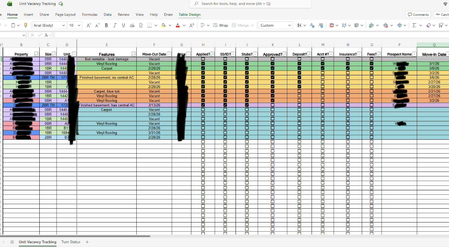
- You mention that the first sheet is sorted by color, and, significantly, you even entertain the thought, "[I wonder] if I should just remove my custom filters from sheet 1 by cell color and just link it that way."
- First: I didn't even know that it was possible to "sort by color"; certainly it's not something I've ever done. In general it's best to leave "raw data" in its rawest state. Adding "pretty" features can get in the way of subsequent processes. I have had the experience of having difficulties in downstream analyses when I've, with all good intentions, applied a sort to my raw data.
- If you want to have a basis for sorting--which in itself is entirely valid--add a field with some datapoint that serves as the basis for the desired sort(s). But even then, I'd suggest you leave the actual sorting to your downstream extractions.
All of that having been said, and not knowing exactly how you've accomplished the "sort by color", My suggestion is that, yes, you do an experiment and remove both the sort and the color. Get to the point where your raw data is just that: raw. I strongly suspect that the alterations to the raw data base may be hindering the kind of extractions you want to do, and appear to be fully able to do on your own.
- LorenzoFeb 18, 2026Silver Contributor
- The checkboxes on the 1st picture suggests 365 is in use
- An anonymized sample takes less than 5 minutes to put in place
- Order of the data in the source Table doesn't matter
With 365 that could be something like (once required/target columns are known):
- MeretrixRexFeb 18, 2026Tin Contributor
To clarify additional info that perhaps I should have included prior - I did try to create a dummy sheet and things just started going wrong trying to share it with a non-company associated account to make a copy to then share the link for, so I gave up and did it the more difficult way after spending about 40 minutes fighting it.
Secondly, I created conditional formatting rules to color the row if a certain selection was made, for easier tracking, and then I used the custom sort filtration option offered by Excel to group each color (which denotes the status of the process) together. I would definitely prefer not sacrificing the ease of this for the ease of auto-population if at all possible.
I appreciate you taking your time to answer and do completely understand that I have added complexity to my desired task with my formatting and filtration choices on Sheet 1.
- mathetesFeb 18, 2026Gold Contributor
That's interesting, for sure. I'm still not sure I'd use that ability with what is essentially a database that you also want to extract things from. Absolutely on a "front end" presentation sheet, such tools are wonderful.
