Forum Discussion

Limit sum of entry in multiple dependent drop down list

Think there are many ways in Excel to do this.
One is conditional formatting. If the value is exceeded, then the red cell (as an example). So the users could also have a learning defect and then correct this until it is no longer red (that's just a thought).
Use conditional formatting to highlight information
The other possibility would be with VBA code
Private Sub Worksheet_Change (ByVal Target As Excel.Range)
If Range ("H10:H20")> 0 Then
MsgBox ("Value exceeded")
Exit Sub
End If
End Sub

'Here is a small approach that just needs to be adjusted.
You could also do it with a formula ... as already said there are many ways that lead to a solution in Excel ... this would just have to suit the user.
*It would also be helpful if you inform us about the Excel version and your operating system, so that you can always receive faster and more precise help.
I would be happy to know if I could help.
Nikolino
I know I don't know anything (Socrates)
* Kindly Mark and Vote this reply if it helps please, as it will be beneficial to more Community members reading here.
 OAN1234Oct 09, 2020Copper Contributor
I'm using Office 2016 on Mac OS.
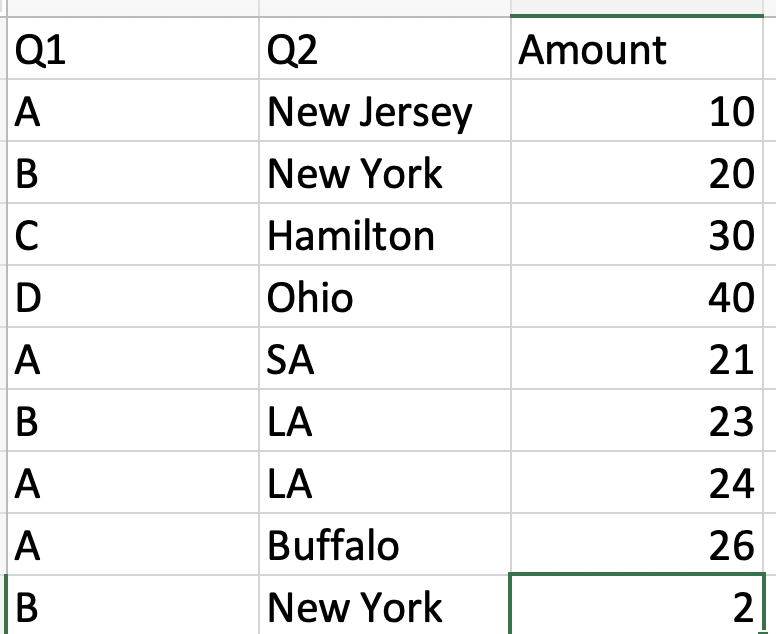
Appreciate your reply, but I don't think it solves my problem. I want specifically to restrict people from going above the limit. As an example, I'm attaching a simple data set. So if you look at it, B and New York is selected in row 2 and 10. If they are selected, i don't want the total of these 2 to exceed a certain amount. Also, i don't know when they will be selected. It could be on row 1000 as well.
- NikolinoDEOct 09, 2020Platinum ContributorUnfortunately, I can't help you with Excel on Mac OS.
But think that some experts who are familiar with Excel on Mac OS will be in touch when they read your message.
Thank you for your feedback, your understanding and your patience.
Nikolino
I know I know nothing (Socrates)