Forum Discussion

Bart963
Jan 25, 2023Copper Contributor
Itteration error
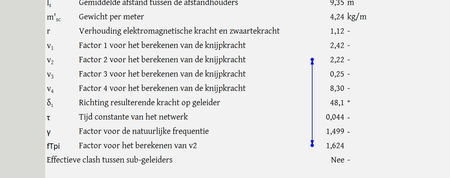
I have made a calculation sheet for work, with an iteration in it, that works. Only to crash when a parameters switches between "Yes" or "No". Now when K82 changes between "Ja" and "Nee" ...

HansVogelaar
Jan 25, 2023MVP
Could you attach a small sample workbook demonstrating the problem (without sensitive data), or if that is not possible, make it available through OneDrive, Google Drive, Dropbox or similar?

Bart963
Jan 25, 2023Copper Contributor
https://docs.google.com/spreadsheets/d/1ZmApWa3etQQKQvC25aAXw_3t7wUQX79P/edit?usp=share_link&ouid=117516061542839428920&rtpof=true&sd=true
In this link should be the excel document with the issue. I have marked yellow which parameter you can alter.
In this link should be the excel document with the issue. I have marked yellow which parameter you can alter.
- HansVogelaarJan 25, 2023MVP
I cannot get the calculation to work at all. If I change the iterative calculation parameters, I sometimes get #DIV/0! (in Dutch #DEEL/0!), but mostly #VALUE!, never a number.
And I'm afraid the formula for v2 is far too complicated (for me) to analyze.
As an alternative, here is a macro that performs an iterative calculation:
Sub Recalc_fTpi()
    Const Precision = 0.0001
    Dim Test As Double
    Application.ScreenUpdating = False
    Application.EnableEvents = False
    If Range("M12").Value = "Nee" Then
        Range("fTpi").Value = 10
        Do
            Test = Range("v_1").Value / Sqr(Range("v_2").Value)
            Range("fTpi").Value = (Test + Range("fTpi").Value) / 2
        Loop Until Abs(Test - Range("fTpi").Value) < Precision
    Else
        Range("fTpi").Value = "N.v.t."
    End If
    Application.EnableEvents = True
    Application.ScreenUpdating = True
End Sub