Forum Discussion

Bart963
Jan 25, 2023Copper Contributor
Itteration error
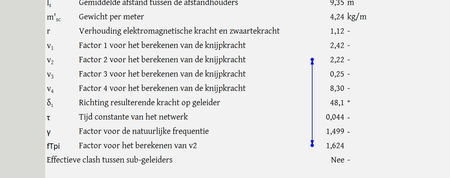
I have made a calculation sheet for work, with an iteration in it, that works. Only to crash when a parameters switches between "Yes" or "No". Now when K82 changes between "Ja" and "Nee" ...

HansVogelaar
Jan 25, 2023MVP
Could you attach a small sample workbook demonstrating the problem (without sensitive data), or if that is not possible, make it available through OneDrive, Google Drive, Dropbox or similar?
 Bart963Jan 25, 2023Copper Contributorhttps://docs.google.com/spreadsheets/d/1ZmApWa3etQQKQvC25aAXw_3t7wUQX79P/edit?usp=share_link&ouid=117516061542839428920&rtpof=true&sd=true
In this link should be the excel document with the issue. I have marked yellow which parameter you can alter.- HansVogelaarJan 25, 2023MVP
I cannot get the calculation to work at all. If I change the iterative calculation parameters, I sometimes get #DIV/0! (in Dutch #DEEL/0!), but mostly #VALUE!, never a number.
And I'm afraid the formula for v2 is far too complicated (for me) to analyze.
As an alternative, here is a macro that performs an iterative calculation:
Sub Recalc_fTpi()
    Const Precision = 0.0001
    Dim Test As Double
    Application.ScreenUpdating = False
    Application.EnableEvents = False
    If Range("M12").Value = "Nee" Then
        Range("fTpi").Value = 10
        Do
            Test = Range("v_1").Value / Sqr(Range("v_2").Value)
            Range("fTpi").Value = (Test + Range("fTpi").Value) / 2
        Loop Until Abs(Test - Range("fTpi").Value) < Precision
    Else
        Range("fTpi").Value = "N.v.t."
    End If
    Application.EnableEvents = True
    Application.ScreenUpdating = True
End Sub