Forum Discussion

is this a bug or a feature? - adding values, result is wrong when last reference is 0
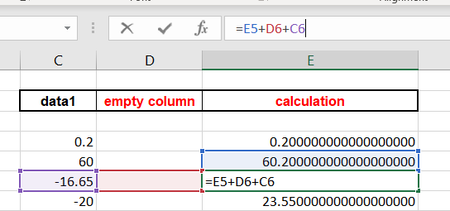
- Aug 25, 2022
It is just a fact of life that floating point calculations are not exact. That is because the binary representations of decimal numbers introduces an error when it is truncated to a fixed length. That means any test for equality must allow some tolerance.
If you multiply by 100 and work with integers the calculations will be exact, though you would have to forgo division.


Change the formulas to:
=ROUND(E11+D12+C12, 2)
=ROUND(E11+C12+D12, 2)
My choice of 2 decimal places is a guess. Choose a number of decimal places that you expect to be accurate.
In general, whenever a calculation might involve or result in values with decimal fractions, explicitly round to the number of decimal places that you expect to be accurate -- and not to an arbitrary number of decimal places like 10.
-----
This is not considered to be defect. But it is a consequence of how Excel (and most applications) represents numbers internally, namely 64-bit binary floating-point.
The details are unimportant. But the consequences are:
1. Most decimal fractions cannot be represented exactly in that binary form. They must be approximated.
2. The binary approximation of a particular decimal fraction might vary depending on the magnitude of the number. That is why, for example, 10.01 - 10 = 0.01 returns FALSE(!).
For that particular example, we can see the reason by entering the formula =10.01-10 formatted as Number with at least 17 decimal places.
But often, the infinitesimal differences are hidden because Excel formats only up to 15 significant digits (rounded).
And yes: sometimes the order of operations make a difference, only by coincidence.
Adding to the confusion: Excel plays tricks with the arithmetic in a misguided attempt to hide the infinitesimal differences -- sometimes.
Consequently, =A1-A2 might return exactly zero, and A1=A2 might return TRUE, but A1-A2=0 returns FALSE(!), MATCH(A1,A2,0) returns #N/A (not a match), and even =A1-A2-0 (!) displays an infinitesimal difference when formatted as General or Scientific.