Forum Discussion

Is there an easier way vs. what I am doing?
- Jul 28, 2022
Hi Budman361530,
the INDIRECT() function resolves the cell link existing within a string and outputs the value. You can compose the strings with the & symbols. You can also use the concatenate() function.

HiBudman361530,
If I understand your question correctly, you do not need a macro to create the cell reference to I18. You can use the Indrict() function or combine it with the Address() function.
I have created a small example document for you. See if the solution meets your expectations.
 Budman361530Jul 27, 2022Brass Contributor
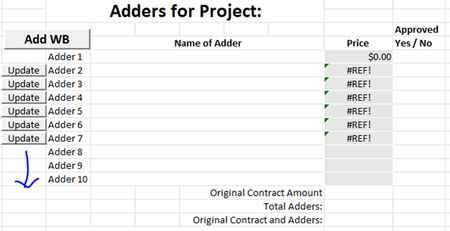
Thank you for your assistance. It is immensely appreciated! However, am having trouble understanding how this works and subsequently cannot get it to work correctly. I used your sheet and created a much-simplified version of my worksheet. See attached. I made a sheet that is hidden, and that's my "adder" templet. The "adder 1" sheet is a simple reference on the summary sheet. Can you please explain to me how that formula knows where to look?
- dscheikeyJul 28, 2022Bronze Contributor
Hi Budman361530,
the INDIRECT() function resolves the cell link existing within a string and outputs the value. You can compose the strings with the & symbols. You can also use the concatenate() function.
- Budman361530Jul 28, 2022Brass Contributor
Sometimes I you just need to see it working to see what you’re missing. I didn’t have the “()” on each side of Adder 2, 3, 4, etc. When your formula was referencing E11, E12, etc, I realized that the sheets were populating as Adder (2), Adder (3), etc. vs Adder 2, Adder 3… Added the “()” on each side of each number, now it makes sense to me. Program is looking for whatever is called out in cells E11, and so on…
Thank you so much for your help.