Forum Discussion

Is there a way to work around Circular reference in Dynamic Array?
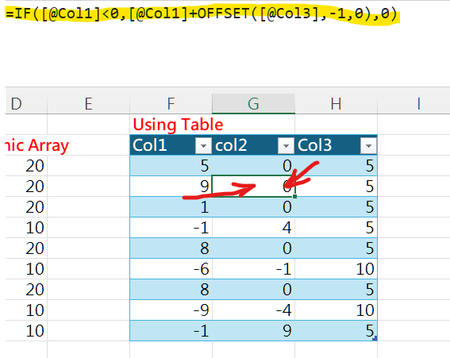
- Jan 05, 2026
One way to achieve this is to utilize a CHOOSE based lambda function to store and recall multiple items at each iteration of SCAN, then MAP the results to return each individual item. For example:
=LET(
    val, LAMBDA([a],[b], LAMBDA(x, CHOOSE(x, a, b))),
    num, SEQUENCE(, 2),
    arr, SCAN(val(), Table1[Col1], LAMBDA(acc,one, LAMBDA(two, val(two, IF(two < 0, 10, 5)))(IF(one < 0, one + acc(2), 0)))),
    MAP(IFNA(arr, num), IFNA(num, arr), LAMBDA(f,x, f(x)))
)
Replace Table1[Col1] with the reference to your dynamic column 1 as needed.

OMG! This is mind blowing! Never thought that Choose can be used like this! EPIC!!
Thank you very much!

You're welcome.
Alternatively, for this specific scenario, since the flow of the 2 dynamically calculated columns is row-major order (left-to-right, top-to-bottom), the following would also work:
=SCAN(0,EXPAND(Table1[Col1],,2),LAMBDA(a,v,IF(ISNA(v),IF(a<0,10,5),IF(v<0,v+a,0))))EXPAND is used to add a second column to Table1[Col1], which is filled with #N/A errors because the optional [pad_with] argument is not specified. This is then used to determine which formula to evaluate by testing if the current value ISNA.
Cheers!
- AlphaEraJan 06, 2026Brass Contributor
Thank you very much for providing additional solutions!! I learnt so much from you! You are absolutely AWESOME!!!