Forum Discussion

itsMonty
Oct 08, 2024Brass Contributor
Is there a way to get a cell to show alternate text based off deliberate characters found in a cell?
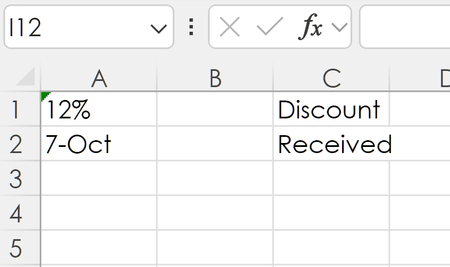
Hello, Is there a formula that will either place "Discount" or "Received" in a cell if another cell contains the characters "%" or "-" in it respectively. I have enclosed a image to better demon...
- Oct 08, 2024try
=IFS(ISNUMBER(SEARCH("%",A1)),"Discount",ISNUMBER(SEARCH("-",A1)),"Received",1,"")
if you have an older version of excel and IFS() doesn't work then:
=IF(ISNUMBER(SEARCH("%",A1)),"Discount",IF(ISNUMBER(SEARCH("-",A1)),"Received",""))


HansVogelaar
Oct 08, 2024MVP
In C1:
=LET(f, LEFT(CELL("format", A1)), SWITCH(f, "P", "Discount", "D", "Received", ""))
Fill down.
 itsMontyOct 08, 2024Brass ContributorThank you for this, it is brilliant. It took me a while to figure out that this works without the need to format the A column as TEXT. Does it recognizes the format and places the text accordingly, that is P for Percentage and D for Date?
- HansVogelaarOct 08, 2024MVP
Yes, indeed - see the Format codes section in CELL function
- itsMontyOct 08, 2024Brass ContributorOooh, that is so cool!
Thanks for following up and thanks for the link! It is very helpful.
You all are amazing! I cannot express it enough.
cheers!