Forum Discussion

Is there a way to count items from the second sheet on my 1st sheet?
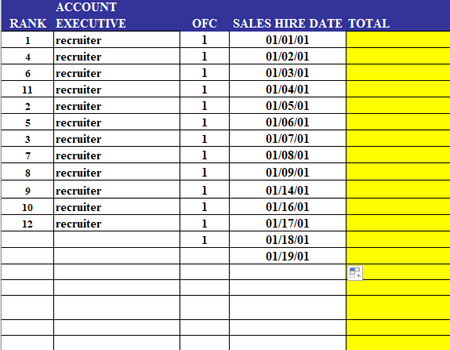

Gidget2324 Assuming "ACCOUNT EXECUTIVE" is in column B and "TOTAL" is in column E, try the following formula in cell E2, then copy down as needed:
=COUNTA(XLOOKUP(B2, Sheet2!$1:$1, Sheet2!$2:$1000, Sheet2!$XFD$1048576))
Note: the reference to Sheet2!$XFD$1048576 in the [if_not_found] argument is used to ensure COUNTA returns 0 instead of 1 when XLOOKUP does not find a match.
Alternatively, I would recommend setting up the client list in a normalized table, so it's easier to keep track of other information too. For example, the client table could have columns for Name, Address, Phone, Email, Date Recruited, etc., as well as a column with a data validation list to select the "ACCOUNT EXECUTIVE". When using structured Excel tables (Insert > Table), the formula to count the number of clients assigned to each executive could be:
=COUNTIF(tblClients[ACCOUNT EXECUTIVE], [@[ACCOUNT EXECUTIVE]])
Note: table names default to "Table1", "Table2", etc. when they are first created, but can be changed by going to the Table Design tab on the Ribbon.
See the attached sample workbook, which contains a separate client sheet for the two methods shown above...