Forum Discussion

sophiekatchu
Apr 01, 2022Copper Contributor
is there a fast way to match my "cell content" to the "row number"
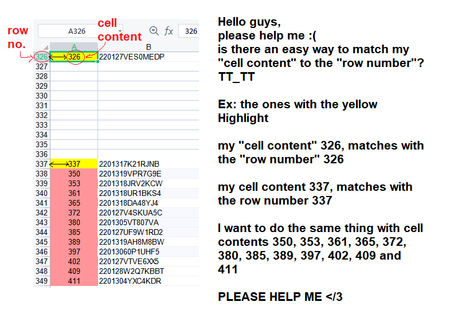
Hello guys, please help me 😞 is there a fast way to match my "cell content" to the "row number"? TT_TT Ex: the ones with the yellow Highlight my "cell content" 326 matches with the "row numb...
 Apr 01, 2022
In the attached file you can click the button in cell H2 to start the macro. Maybe this is what you are looking for.
Sub rownumber()

Dim i As Integer
Dim z As Integer

For i = 1 To 1000

If Cells(i, 1).Value > 0 Then

z = Cells(i, 1).Value

Cells(z, 5).Value = Cells(i, 1).Value
Cells(z, 6).Value = Cells(i, 2).Value

Else
End If

Next i

End Sub
OliverScheurich
Apr 01, 2022Gold Contributor
In the attached file you can click the button in cell H2 to start the macro. Maybe this is what you are looking for.
Sub rownumber()

Dim i As Integer
Dim z As Integer

For i = 1 To 1000

If Cells(i, 1).Value > 0 Then

z = Cells(i, 1).Value

Cells(z, 5).Value = Cells(i, 1).Value
Cells(z, 6).Value = Cells(i, 2).Value

Else
End If

Next i

End Sub
sophiekatchu
Apr 10, 2022Copper Contributor
WOAHHH THIS IS THE ANSWER I'M LOOKING FOR T,T THANK YOU SO MUCH~~
But the problem is... I don't know how I'm going to tweak the formula 😅 can you please teach me how? 🙏 here's a sample data set:
But the problem is... I don't know how I'm going to tweak the formula 😅 can you please teach me how? 🙏 here's a sample data set:
- sophiekatchuApr 10, 2022Copper Contributor
- OliverScheurichApr 11, 2022Gold Contributor
Sub rownumber()

Dim LngZeileMax As Integer
Dim z As Integer
Dim i As Integer

LngZeileMax = Cells(Rows.Count, 1).End(xlUp).Row

For i = 3 To LngZeileMax

If Cells(i, 1).Value > 0 Then

z = Cells(i, 1).Value

Cells(z, 13).Value = Cells(i, 1).Value
Cells(z, 14).Value = Cells(i, 2).Value
Cells(z, 15).Value = Cells(i, 3).Value
Cells(z, 16).Value = Cells(i, 4).Value

Else
End If

Next i

End Sub
Maybe with these lines of code. You can click the button in cell Q2 to start the macro. The results are in columns 13 to 16.