Forum Discussion

sophiekatchu
Apr 01, 2022Copper Contributor
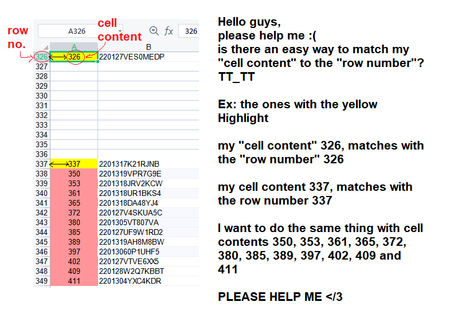
is there a fast way to match my "cell content" to the "row number"
Hello guys, please help me 😞 is there a fast way to match my "cell content" to the "row number"? TT_TT Ex: the ones with the yellow Highlight my "cell content" 326 matches with the "row numb...
 Apr 01, 2022
In the attached file you can click the button in cell H2 to start the macro. Maybe this is what you are looking for.
Sub rownumber()

Dim i As Integer
Dim z As Integer

For i = 1 To 1000

If Cells(i, 1).Value > 0 Then

z = Cells(i, 1).Value

Cells(z, 5).Value = Cells(i, 1).Value
Cells(z, 6).Value = Cells(i, 2).Value

Else
End If

Next i

End Sub

Riny_van_Eekelen
Apr 01, 2022Platinum Contributor
sophiekatchu Perhaps you just type =ROW() in a cell in column A and copy it down.
 sophiekatchuApr 01, 2022Copper Contributorit doesn't work, but thank you so much Riny 😞
what I want is to sort it easily where the cell number matches with the corresponding row number
so if my cell contains the number 15, I want it to be in row number 15
What I do is I do it "manually", I highlight then insert cells down until it reaches the corresponding row number ~it's tiresome and it's eating up my time too much 💔- Riny_van_EekelenApr 01, 2022Platinum Contributor
sophiekatchu As a variant, I came up (after some thought) with a PowerQuery solution. Assuming that your columns will have headers and that there may be an unknown number of columns in the Table.
File attached.
Edit: Made a small change to the query.
- Riny_van_EekelenApr 01, 2022Platinum Contributor
sophiekatchu Okay, Than I understand. Need to think, but it probably requires a VBA solution, which isn't my kind of thing. Sorry!