Forum Discussion

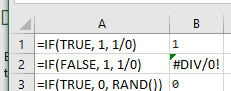
Is =IF true/false conditions non-strict or strictly evaluated?
- Oct 24, 2019
As far as I know, Excel does short-circuiting on IF and does not evaluate the "other part". You should be able to check that by logging which cells call your UDF (application.caller returns a pointer to that cell):
Public Function foobar()
    Debug.Print Application.Caller.Address
End Function

As far as I know, Excel does short-circuiting on IF and does not evaluate the "other part". You should be able to check that by logging which cells call your UDF (application.caller returns a pointer to that cell):
Public Function foobar()
    Debug.Print Application.Caller.Address
End Function
JKPieterse Thanks for your helpful reply.
I was able to figure out that the issue was that my RtdServer was blocking the Excel UI thread, which caused unexpected behavior. In addition, I discovered that in Excel 2007, Excel began supporting multi-threaded workbook calculations, and in Excel 2013, further enhanced multi-threaded workbook calculations with settings to disable on enable on a per-sheet basis these calculations. I believe I had something like 84 cells calling my RtdServer via:
=IF(Some_Named_Cell, RTD("ProgId",,topic1,topic2,topic3,topic4)