Forum Discussion

huskereurocat
Jun 21, 2023Copper Contributor
Is an IF statment the best for this situation?
I've been trying to think of a way to write an IF statement, but am having a hard time understanding how to make this work. I have two columns of information so I hope that makes this easier. In the ...
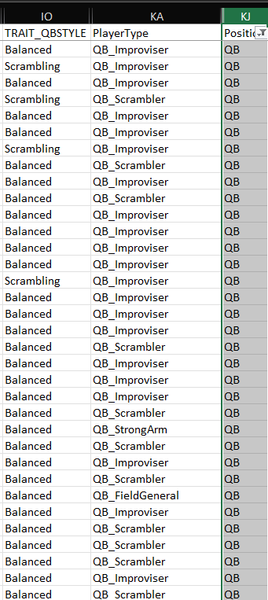
- Jun 22, 2023
I think I switched the terms.
Sub Convert()
    Dim rng As Range
    Dim typ As Range
    Dim adr As String
    Application.ScreenUpdating = False
    Set rng = Range("IO:IO").Find(What:="Scrambling", LookAt:=xlWhole)
    If Not rng Is Nothing Then
        adr = rng.Address
        Do
            Set typ = Range("KA" & rng.Row)
            If typ.Value = "QB_Scrambler" Then
                typ.Value = "QB_Improviser"
            End If
            Set rng = Range("IO:IO").Find(What:="Scrambling", After:=rng, LookAt:=xlWhole)
            If rng Is Nothing Then Exit Do
        Loop Until rng.Address = adr
    End If
    Application.ScreenUpdating = True
End Sub


huskereurocat
Jun 22, 2023Copper Contributor
Thanks for helping! Please forgive me, but I'm clueless about VBA coding. I can record a macro, but when it comes to editing that Macro in Visual Basic, I don't know what I'm looking at. I'm not sure where to go from here. My goal here is to automate the change of the information in the cells in the Player Type column. Help, because I'm lost now!

Detlef_Lewin
Jun 22, 2023Silver Contributor
- huskereurocatJun 22, 2023Copper ContributorThanks for your help though!
- HansVogelaarJun 22, 2023MVP
Try this macro. Please test on a copy of the worksheet.
Sub Convert() Dim rng As Range Dim typ As Range Dim adr As String Application.ScreenUpdating = False Set rng = Range("IO:IO").Find(What:="Scrambling", LookAt:=xlWhole) If Not rng Is Nothing Then adr = rng.Address Do Set typ = Range("KA" & rng.Row) If typ.Value = "QB_Improviser" Then typ.Value = "QB_Scrambler" End If Set rng = Range("IO:IO").Find(What:="Scrambling", After:=rng, LookAt:=xlWhole) If rng Is Nothing Then Exit Do Loop Until rng.Address = adr End If Application.ScreenUpdating = True End Sub- huskereurocatJun 22, 2023Copper Contributor
Thanks for your help!
It would seem that this Macro inserts a lot of QB_Scrambler's into Player Type column. Can it be revised to just look for Scrambling - QB_Scrambler and change that to Scrambling - QB_Improviser? Just need to change the Player Type in this case to QB_Improviser.This what the unedited version looks like:
This is what the current version of the Macro returns: