Forum Discussion

Is an IF statment the best for this situation?
- Jun 22, 2023
I think I switched the terms.
Sub Convert()
    Dim rng As Range
    Dim typ As Range
    Dim adr As String
    Application.ScreenUpdating = False
    Set rng = Range("IO:IO").Find(What:="Scrambling", LookAt:=xlWhole)
    If Not rng Is Nothing Then
        adr = rng.Address
        Do
            Set typ = Range("KA" & rng.Row)
            If typ.Value = "QB_Scrambler" Then
                typ.Value = "QB_Improviser"
            End If
            Set rng = Range("IO:IO").Find(What:="Scrambling", After:=rng, LookAt:=xlWhole)
            If rng Is Nothing Then Exit Do
        Loop Until rng.Address = adr
    End If
    Application.ScreenUpdating = True
End Sub


I put your question to the Bing chatbot. Here is its answer:
It sounds like you're trying to use an IF statement in a spreadsheet program to categorize data based on the values in two columns. You can use a nested IF statement to achieve this. Here's an example formula that you can enter into the Player Type column:
`=IF(A2="Scrambling", "QB_Improviser", IF(A2="Balanced", "QB_Scrambler", ""))`
This formula checks if the value in cell A2 (Trait_QBStyle column) is "Scrambling". If it is, the formula returns "QB_Improviser". If it's not, the formula checks if the value is "Balanced". If it is, the formula returns "QB_Scrambler". If it's neither "Scrambling" nor "Balanced", the formula returns an empty string.
You can then drag this formula down to apply it to all rows in the Player Type column. Does this help?
 huskereurocatJun 22, 2023Copper Contributor
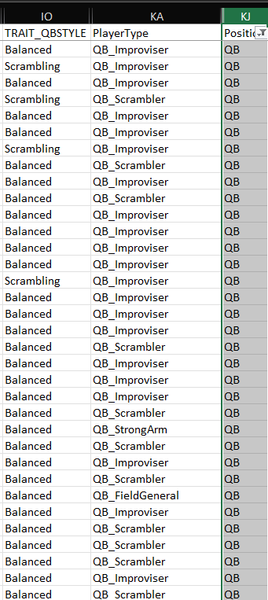
Thanks for the research and answer. There seems to be only one problem with this formula. If you look at the snapshot below, you can see that what gets returned is either a Balanced - QB_Scrambler or a Scrambling - QB_Improviser. Nowhere in the formula is there a possibility of a Balanced - QB_Improviser, which there needs to be.
Somehow we need to have the formula check if there is a Scrambling - QB_Scrambler (highlighted in yellow below) in which case that would need to be a Scrambling - QB_Improviser.
So we're left with the three possibilties highlighted in green below.
Is that even possible with an IF statement? Somehow, I would think, the formula would need to see there is a Scrambling - QB_Scrambler and change it to Scrambling - QB_Improviser. Can that be done?
Thanks,
Kelly
- Detlef_LewinJun 22, 2023Silver Contributor
Somehow, I would think, the formula would need to see there is a Scrambling - QB_Scrambler and change it to Scrambling - QB_Improviser. Can that be done?
Now we are getting there.
This is not possible with a formula but with VBA.
However you can use conditional formatting to highlight the cells.
Column A is TRAIT_OBSTYLE and column B is PlayerType.
=COUNTIFS($A2,"Scrambling",$B2,"QB_Scrambler")- huskereurocatJun 22, 2023Copper ContributorThanks for helping! Please forgive me, but I'm clueless about VBA coding. I can record a macro, but when it comes to editing that Macro in Visual Basic, I don't know what I'm looking at. I'm not sure where to go from here. My goal here is to automate the change of the information in the cells in the Player Type column. Help, because I'm lost now!