Forum Discussion

excel_learner
Dec 13, 2021Brass Contributor
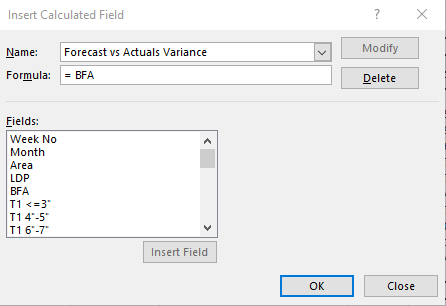
Inserting Calculated Field to show Forecast vs Actuals Variance
Hi I'm trying to insert a calculated field to show Forecast vs Actual Variance. The trouble I'm having is the Forecast and Actuals are under BFA in the field list which Stands for Budget Forecast A...

Martin_Weiss
Dec 13, 2021Bronze Contributor
the possibilities for formulas in a calculated field in a Pivot table are very limited and restricted to just some basic arithmetic functions like +-*/ and simple worksheet functions like MIN or MAX.
There is no way to do more complex formulas in a calculated field.
So in my opinion you have two options:
1. Create new calculated fields directly in the source table (if possible at all)
2. Use Power Pivot and create measures.
The second option, of course, is more complex and depends on the availability and knowledge of Power Pivot and also on the structure of your source data.