Forum Discussion

aquigley1
Mar 11, 2025Brass Contributor
Index Match broken after update
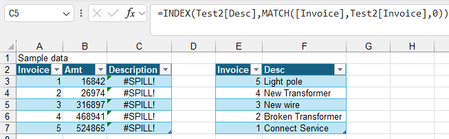
I am used to using Index Match to combine information from 2 tables into 1 table, matching based on a unique field, such as invoice number. Excel used to crash frequently, until IS upgraded my Excel ...
 Mar 11, 2025
=INDEX(Test2[Desc],MATCH([@Invoice],Test2[Invoice],0))This formula works in my sample file.

aquigley1
Mar 11, 2025Brass Contributor
So taking out the first and third @ fixes it? Do you know what the @ signs are for? What do they do?
OliverScheurich
Mar 11, 2025Gold Contributor
Here are two guides on how to use structured references in dynamic tables with VLOOKUP or INDEX and MATCH and how to use @.
- aquigley1Mar 12, 2025Brass Contributor
Thank you! So it looks like the @ is only used within the current table, not when referencing outside tables.