Forum Discussion

aquigley1
Mar 11, 2025Brass Contributor
Index Match broken after update
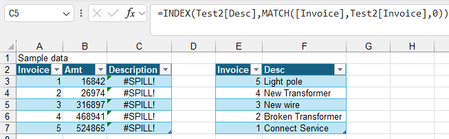
I am used to using Index Match to combine information from 2 tables into 1 table, matching based on a unique field, such as invoice number. Excel used to crash frequently, until IS upgraded my Excel ...
 Mar 11, 2025
=INDEX(Test2[Desc],MATCH([@Invoice],Test2[Invoice],0))This formula works in my sample file.
OliverScheurich
Mar 11, 2025Gold Contributor
=INDEX(Test2[Desc],MATCH([@Invoice],Test2[Invoice],0))This formula works in my sample file.

aquigley1
Mar 11, 2025Brass Contributor
So taking out the first and third @ fixes it? Do you know what the @ signs are for? What do they do?
- OliverScheurichMar 11, 2025Gold Contributor
Here are two guides on how to use structured references in dynamic tables with VLOOKUP or INDEX and MATCH and how to use @.
- aquigley1Mar 12, 2025Brass Contributor
Thank you! So it looks like the @ is only used within the current table, not when referencing outside tables.