Forum Discussion

Index & Match based on a substring of the look up value contained in a 2-dimension array
 Jan 25, 2022
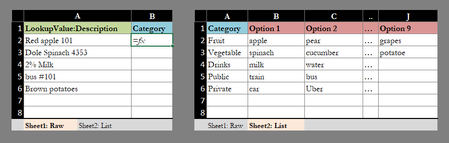
If I may, a few suggestions to modifying the formula:
1) change Search(F2:I6, A2) to Search(A2, F2:I6). I believe blank cells in your data will match to A2 and could return incorrect results, but it won't match in the other direction.
2) Instead of hardcoding the array of 1's, you could use TRANSPOSE(COLUMN($F$2:$I$2)) - if you insert columns, the formula should update.
3) Try --(MMULT(...)>0). If you had "red apple" and "green apple" in the same row, mmult would return 2 for that row (searching for "apple"), causing match to fail (as match is looking for "1"). Also, using column() in #2 instead of an array of 1's makes this necessary.
4) You could wrap the formula with Iferror for instances where nothing matches.
Note you will need to use Ctrl+Shift+Enter if you don't have office 365 (because of the transpose function):
=IFERROR(INDEX($E$2:$E$6,MATCH(1,--(MMULT(--(ISNUMBER(SEARCH(A2,$F$2:$I$6))),TRANSPOSE(COLUMN($F$2:$I$2)))>0),0)), "No Match")
I do have Excel 365. Can you explain how SEQUENCE() and LET() make the formular more reliable? How would one implement these in the formula above?
After looking over this thread again, I can see I erred in suggesting the search arguments could be switched - really not sure what I was thinking. Sounds like you've already sorted it out, though.
One thing that would be an issue going forward would be if you added on to your table by adding rows at the bottom or columns to the right - the range references in the formula won't update unless the row/columns were inserted in the middle of the table. So, along the lines of what Sergei is suggesting to make it more reliable, I think you could convert the table to a structured table, and use the let function to define the data range (all columns after the first column), so if you added another option category later, you shouldn't need to update the formula's range reference(s)).
I don't yet have the latest office 365 functions, but I think something like this:
Let(data, index(Table1,1,2):index(Table1,rows(Table1),columns(Table1)),
         searchresults, --(MMULT((ISNUMBER(SEARCH(data,A2)))*(NOT(ISBLANK(data))),TRANSPOSE(COLUMN(data)))>0),
        IFERROR(INDEX(Table1[Category],MATCH(1,searchresults,0)), "No Match")