Forum Discussion

Import data from different sheets based off one cell
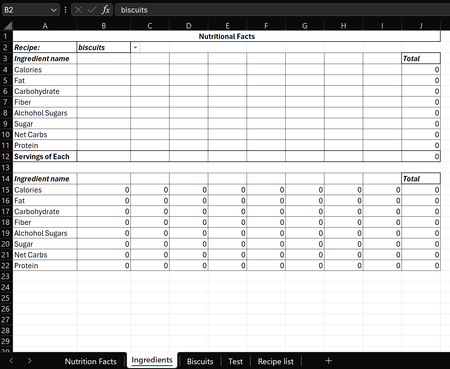

I figured out this formula =IFS(Biscuits!B1=B2,Biscuits!B2:I12,Test!B1=B2,Test!B2:I12,TRUE,"") which works. If there is better way let me know. I would rather not have to add to the formula every time I add a recipe.

Your approach using the IFS function works, but it requires manually updating the formula each time you add a new recipe tab. Instead, you can use the INDIRECT function combined with the VLOOKUP function to dynamically reference the appropriate recipe tab based on the selection in cell B2.
Here is how you can do it:
- Create a table in each recipe tab with the nutrition facts. The first column should contain the item names, and the subsequent columns should contain the corresponding nutrition facts.
- In your ingredients tab, use the following formula to dynamically reference the selected recipe tab and retrieve the nutrition facts:
=IFERROR(VLOOKUP(A2,INDIRECT("'"&$B$2&"'!A:I"),COLUMN(B2),FALSE),"")
In this formula:
- A2 is the item name in your ingredients tab.
- $B$2 contains the name of the selected recipe tab.
- INDIRECT("'"&$B$2&"'!A:I") dynamically generates the reference to the selected recipe tab.
- VLOOKUP searches for the item name in the selected recipe tab and retrieves the corresponding nutrition fact from the specified column.
- COLUMN(B2) dynamically adjusts the column index in the VLOOKUP function as you drag the formula across columns in your ingredients tab.
- IFERROR handles cases where the item name is not found in the selected recipe tab.
With this setup, you won't need to manually update the formula when you add new recipe tabs. Just ensure that the item names are consistent across all recipe tabs. The text was created with the help of AI.
My answers are voluntary and without guarantee!
Hope this will help you.
Was the answer useful? Mark as best response and Like it!
This will help all forum participants.