Forum Discussion

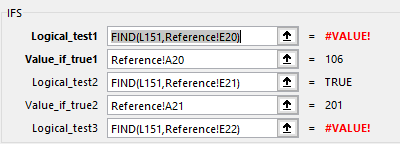
IFS Shows #VALUE! instead of actual value
- May 10, 2021
See the attached version.


See the attached version.
- tombabcdMay 17, 2021Copper Contributor
- tombabcdMay 17, 2021Copper Contributor
Hi Hans,
Thank you again for the help. It works great.
Can I ask about a portion of the formula.
=INDEX(Reference!$A$15:$A$21,MATCH("*"&M3&"*|*"&N3&"*",Reference!$D$15:$D$21&"|"&Reference!$E$15:$E$21,0))
Is the "*"& making this a wild card search or converting the number to text or both?
Is the *|* concatenating two columns of search data together?I have searched in vain for the meaning of the "|" in Excel but have not found anything.
Also I have read the Excel help on Arrays, Index and Match but have not found the answers.While I am at it can I ask the following:
If I want to pick up the last amount in a row is there an easy way to do so, i.e. pick up 1,000 for 2010,550 for 2011, 580 for 2012, 490 for 2013, etc.
Year 1 2 3 4 5 6 7 8 9 10 2010 100 200 300 400 500 600 700 800 900 1,000 2011 150 200 250 300 350 400 450 500 550 2012 230 280 330 380 430 480 530 580 2013 310 340 370 400 430 460 490 2014 350 360 370 380 390 400 2015 370 380 390 400 410  Lebantino_Marvin_reyesMay 17, 2021Copper ContributorHi
- HansVogelaarMay 17, 2021MVP
The last value in B2:K2 is returned by
=LOOKUP(9.99999999999999E+307,B2:K2)
9.99999999999999E+307 is the very largest number that can be entered in an Excel worksheet; it won't be found so LOOKUP returns the last value it encounters in the specified range.
The formula can be filled/copied down.
- tombabcdMay 17, 2021Copper Contributor
I promise I will not keep abusing your hospitality. I have tried to figure this out for days but am running out of time with so many priorities to get done. I thought it would be much simpler than the solution you provided with the Index/Match. I think this also requires that but it is somewhat different.
I am uploading a sample file of data.
Basically I am trying to look up a combination of the Coverage (col A) and Desc. (col B) of the statement tab against the last 3 positions of the $Segment (col A) and Year (i.e. Desc lookup) (col D). I extracted the year from the Accd Date column since I didn't want to make the formula too long.
The other value to lookup is in Row 1 of the statement tab - values are Stat19A and Stat21A
against the Statistic column (col B) of the data tab.
I tried using an Xmatch but could not get it to work.
The other thing is I only need to bring back the last value of the row for each Year. So 2010 is col N, 2011 is col M. I wasn't sure if there was an easy way to just subtract 1 from the next row down or use the column headings of 1-10 which correlate to years in terms of 10 years of data for 2010, 9 years of data for 2011, 8 years of data for 2012, down to one year of data for 2019.
Again, I will not keep posting a question for every Excel question I have but if you can help with this I think between this and your first solution I will have enough to figure out the solutions to similar needs.
Does the "|" concatenate two arrays of data together for a search?
Thank you.
Tom
- tombabcdMay 10, 2021Copper ContributorThank you Hans! I feel a bit guilty for not taking the tips and figuring this out myself which I had every intention of doing but barely finished getting ledger entries in by the deadline. I cannot thank you and @Sergei enough. Thank you both for taking the time for responding and thank you again for taking the time and effort to get this working. I can't wait to explore each function and learn more about how they work and the best situations to use them in.
I have taken several Excel training classes but they don't begin to touch on things like this.
Thanks again!!!- SergeiBaklanMay 11, 2021Diamond Contributor
tombabcd , glad it helped, good luck with Excel
