Forum Discussion

MAVOTRP
Mar 14, 2024Copper Contributor
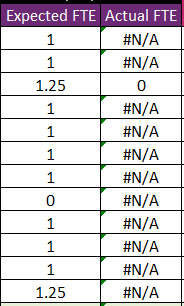
IFERROR formula still returning #N/A
Hello. I have a formula to return either 0 or the cell value * the corresponding match in Table 1: =IF(AND(ISNUMBER(MATCH(1, (Table1[Name adjusted]=A6)*(Table1[Leave Date]=$C$4), 0)), INDEX(Tabl...

SergeiBaklan
Mar 17, 2024Diamond Contributor
In your formula
=IF(
    AND(
        ISNUMBER(MATCH(1, (Table1[Name adjusted]=A6)*(Table1[Leave Date]=$C$4), 0)),
        INDEX(
            Table1[Activity duration - For part-day availability],
            MATCH(A6&$C$4, Table1[Name adjusted]&Table1[Leave Date], 0)
            )=1), 0,
    IFERROR(
        C6*INDEX(
            Table1[Activity duration - For part-day availability],
            MATCH(A6&$C$4, Table1[Name adjusted]&Table1[Leave Date], 0)
        ),
    "")
)
if first MATCH() returns #N/A, when INDEX() on top also returns #N/A, thus AND() as well. Result of =IF(#N/A, IFERROR(calculation, "")) will be #N/A.
Aa variant you may wrap first INDEX by ISNUMBER, depend on what you'd like to receive.

MAVOTRP
Mar 17, 2024Copper Contributor
Hi Sergei. Thank you for your response. I am getting an error saying I have too many arguments. Do you mind showing how to wrap the first INDEX by ISNUMBER? I may not be doing it correctly. Thank you.