Forum Discussion

IFERROR formula still returning #N/A
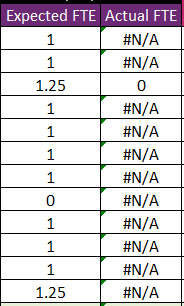

Try this modification of your formula, maybe it will help you further with your plans.
=IF(AND(ISNUMBER(MATCH(1, (Table1[Name adjusted]=A6)*(Table1[Leave Date]=$C$4), 0)), INDEX(Table1[Activity duration - For part-day availability], MATCH(A6&$C$4, Table1[Name adjusted]&Table1[Leave Date], 0))=1), 0, IF(ISERROR(C6*INDEX(Table1[Activity duration - For part-day availability], MATCH(A6&$C$4, Table1[Name adjusted]&Table1[Leave Date], 0)))), "", C6*INDEX(Table1[Activity duration - For part-day availability], MATCH(A6&$C$4, Table1[Name adjusted]&Table1[Leave Date], 0)))
This modification checks if the result of the expression C6*INDEX(...) produces an error using ISERROR, and if it does, it returns "" (an empty string). Otherwise, it returns the result of the expression. This should prevent #N/A from being displayed when an error occurs.
My answers are voluntary and without guarantee!
Hope this will help you.
Was the answer useful? Mark as best response and like it!
This will help all forum participants.
 MAVOTRPMar 17, 2024Copper ContributorHi Nikolino. I am trying your formula however I am getting the dialogue box saying There's a problem with this formula. I have tried moving one of the ) to the end and the formula is accepted, however it is still returning #N/A. Not sure if what I've done is correct see below:
=IF(AND(ISNUMBER(MATCH(1, (Table1[Name adjusted]=A6)*(Table1[Leave Date]=$C$4), 0)), INDEX(Table1[Activity duration - For part-day availability], MATCH(A6&$C$4, Table1[Name adjusted]&Table1[Leave Date], 0))=1), 0, IF(ISERROR(C6*INDEX(Table1[Activity duration - For part-day availability], MATCH(A6&$C$4, Table1[Name adjusted]&Table1[Leave Date], 0))), "", C6*INDEX(Table1[Activity duration - For part-day availability], MATCH(A6&$C$4, Table1[Name adjusted]&Table1[Leave Date], 0))))
Any guidance would be appreciated. Thank you!- NikolinoDEMar 17, 2024Platinum Contributor
It seems like there was a small typo in the formula you provided. The extra parenthesis at the end of the formula is causing the syntax error. Here's the corrected version of the formula:
=IF(AND(ISNUMBER(MATCH(1, (Table1[Name adjusted]=A6)*(Table1[Leave Date]=$C$4), 0)), INDEX(Table1[Activity duration - For part-day availability], MATCH(A6&$C$4, Table1[Name adjusted]&Table1[Leave Date], 0))=1), 0, IF(ISERROR(C6*INDEX(Table1[Activity duration - For part-day availability], MATCH(A6&$C$4, Table1[Name adjusted]&Table1[Leave Date], 0))), "", C6*INDEX(Table1[Activity duration - For part-day availability], MATCH(A6&$C$4, Table1[Name adjusted]&Table1[Leave Date], 0))))
In this corrected formula, I removed the extra parenthesis at the end so that the syntax is correct. Please try using this formula and see if it resolves the issue with the #N/A error.
- MAVOTRPMar 18, 2024Copper ContributorThank you Nikolino. I have used your formula however it is still returning #N/A. I have followed the advice from SandeepMarwal below and it is returning #N/A so it seems that the problem is with the logical test. Would you be able to provide guidance on how to adjust?
AND(ISNUMBER(MATCH(1, (Table1[Name adjusted]=A10)*(Table1[Leave Date]=$C$4), 0)), INDEX(Table1[Activity duration - For part-day availability], MATCH(A10&$C$4, Table1[Name adjusted]&Table1[Leave Date], 0))=1)
I have extracted the part that Sandeep is referring to. I am tying to achieve the following:
Sheet 1
Column A Name
Column C Numerical value (generally 1 or 0)
Sheet 2
Table 1
Column A Name adjusted
Column B Leave Date
Column C Activity duration - For part-day availability
The formula is checking all three columns in Table 1 on Sheet 2 for a match. If there is a match for all three, and the value in Column C is 100%, return 0. If it is NOT a match for all three, or Column C is not 100%, e.g., 25%, then return value in C6 (Sheet 1) * the corresponding value in Table 1 Column C (25% / 50% / 75%).
The formula works fine when there is a match for all three, and the value in Column C is 100%, the formula returns 0. However, when it is NOT a match for all three or it is not 100%, it returns #N/A instead of returning the value in C6 (Sheet 1) * the corresponding value in Table 1 Column C (25% / 50% / 75%).