Forum Discussion

If two cells contain specific values, portray data in third cell
 Mar 25, 2023
=INDEX(Table4_2[Market Price]:Table4_2[Market Price],MATCH(1,(Table4_2[SET]:Table4_2[SET]='TEST FORMULA OWNED CARDS'!J2)*(Table4_2[PRODUCT]:Table4_2[PRODUCT]='TEST FORMULA OWNED CARDS'!M2),0))Does this formula return the expected result of 0,13? I assume that within the "test formula owned cards" sheet we have to reference single cells like this:
'TEST FORMULA OWNED CARDS'!J2.
Otherwise you can send me your file without sensitive data and i'll try to help.
=INDEX($I:$I,MATCH(1,($D:$D=L2)*($F:$F=N2),0))Is this similar to what you are looking for? The formula has to be entered with ctrl+shift+enter if one doesn't work with Office 365 or Excel 2021.

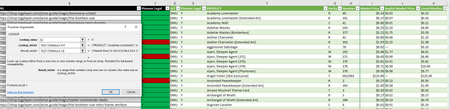
=INDEX(Table4_2[Market Price]:Table4_2[Market Price],MATCH(1,(Table4_2[SET]:Table4_2[SET]='TEST FORMULA OWNED CARDS'!J:J)*(Table4_2[PRODUCT]:Table4_2[PRODUCT]='TEST FORMULA OWNED CARDS'!M:M),0))OliverScheurich This looks like exactly what I'm trying to do. I did my best to replicate your formula replacing your relevant values with the corresponding values in my book, but without looking, receiving #N/A even though the data exists. I'd be willing to send you my Excel sheet to look at directly if you have the time and would be willing, but I'll add screen shots of how my formula looked, and the relevant sheets. "Table 4_2" is the data from the web query, and "test formula owned cards" is the sheet I'm pulling data to.
And this is the data showing it exists
- OliverScheurichMar 25, 2023Gold Contributor
=INDEX(Table4_2[Market Price]:Table4_2[Market Price],MATCH(1,(Table4_2[SET]:Table4_2[SET]='TEST FORMULA OWNED CARDS'!J2)*(Table4_2[PRODUCT]:Table4_2[PRODUCT]='TEST FORMULA OWNED CARDS'!M2),0))Does this formula return the expected result of 0,13? I assume that within the "test formula owned cards" sheet we have to reference single cells like this:
'TEST FORMULA OWNED CARDS'!J2.
Otherwise you can send me your file without sensitive data and i'll try to help.
- JakeSWM217Mar 25, 2023Copper ContributorYES! Thank you so much! I had the idea to build this data sheet a week or so ago, having never even opened excel before. My original test of 1 set worked perfectly, but this large scale issue has held me up for days. I really appreciate this ❤️