Forum Discussion

IF Function problems
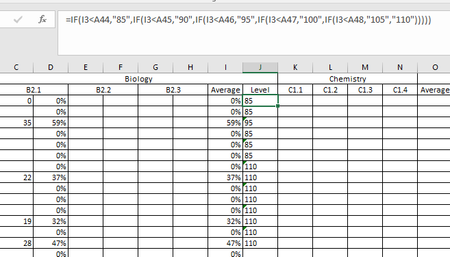

Hello,
do you have a table with static values in cell A44 to A48? Do you want the formula to always look at these cells? Then you can use absolute references, with $ signs in front of the column letter and the row number, i.e. $A$44 instead of A44. Then, when the formula is copied down, it will still refer to $A$44.
Is there a reason you put the numbers into quotes, like "85" instead of just 85? That will return them as text and you can't easily use the values in calculations later on.
It is also better to use a lookup formula to look up the values instead of hard-coding them into the formula. That way, if your level definitions ever change, you only need to change the number in one place. For example, put the threshold values into A44 to A49 and in B44 to B49 put the result values. then you can use
=VLOOKUP(I3,$A$44:$B$49,2,TRUE)
With TRUE as the last parameter, Vlookup will use an approximate lookup which is perfect for lookups for numbers in a range from x to z.

Hi,
Thank you so much for your help, using the VLOOKUP that you suggested worked perfectly!
Can you / anyone else help with the conditional formatting that I'd like to use to colour code the cells in column J? I still can't get it to work.
thanks
Catherine