Forum Discussion

IF formula to calculate outcome
 Aug 12, 2022
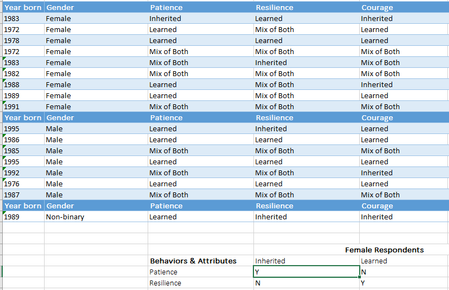
=SUMPRODUCT(($C$1:$E$1=$C13)*($C$2:$E$10=D$12))You can try this formula for the data layout of the example.
=SUMPRODUCT(($C$1:$E$1=$C13)*($C$2:$E$10=D$12))You can try this formula for the data layout of the example.
 jojo29Aug 12, 2022Copper ContributorWhat do the $ symbols represent? And also what are the numbers you have as part of the formula C1 E1 C13 and C2 E10 D12?
- HansVogelaarAug 12, 2022MVP
$C$1:$E$1 is the range from cell C1 to cell E1. The $ signs indicate that the reference to the range is absolute, i.e. it won't change when you fill or copy the formula to other cells.
$C13 is a reference to cell C13. Here the reference to the column letter C is absolute (fixed), but the reference to the row number 13 is relative (not absolute): it will change when you fill or copy the formula to other cells.
The expression $C$1:$E$1=$C13 returns an array of TRUE/FALSE values: TRUE for each cell in C1:E1 that equals C13, FALSE otherwise.
Similarly, $C$2:$E$10=D$12 returns an array of TRUE/FALSE values. $C$2:$E$10 is an absolute reference to C2:E10, while D$12 is mixed: the column letter D is relative (changeable) and the row number 12 is absolute.
- jojo29Aug 12, 2022Copper ContributorOliverScheurich thank you so much. I knew someone would have an answer ASAP. Have a good day
