Forum Discussion

ahess2004
Jul 27, 2022Copper Contributor
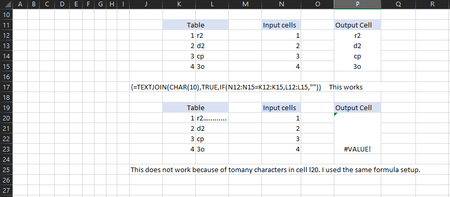
IF formula not listing all the information from target cell. Is there a limit on data in cells?
I have a TEXTJOIN IF formula that works but in the target location i get a #VALUE. I went looking on why and couldn't find a reason. I noticed that the cell it was grabbing would work if there was ma...

Jul 27, 2022
This should be array, you must once you finish type the formula, press Ctrl+Shift+Enter at the same time

ahess2004
Jul 27, 2022Copper Contributor
Those were examples. in the picture i show what I'm talking about. if the cell has too many characters inside it for some reason it wont return properly unless i single out the cell.
- Jul 27, 2022I missed that, I just updated my answer,
once you write the formula just press Ctrl+Shift+Enter at the same time- ahess2004Jul 27, 2022Copper ContributorOk so that didn't work either. I did find out that you can't do a Ctrl+Shift+Enter in merged cells though. It just gave me the same #VALUE!.
- Jul 27, 2022when you are dealing with array, it depends on the formula like the on on the photo, it is a matter of the targeted cell should be the same number as the source. So in this case it will give you error since the target cell merged cell which means just 1 cell.