Forum Discussion

jop25
Jul 23, 2021Copper Contributor
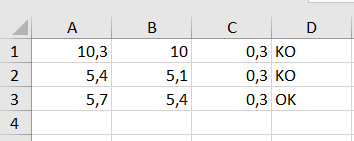
if different results
How is this happening? C = A-B D=IF(C1=0,3,"OK","KO") How to fix that?

jop25
Jul 23, 2021Copper Contributor

NikolinoDE
Jul 23, 2021Platinum Contributor
OK thx for the info 🙂
Works or works not now?
As I've always said, I never stop learning and mostly don't know anything.
Belong to the old school knows a lot of things, but nothing specific:)).
I would be happy to know if it helped you or not.
At your disposal for further questions,
I hope that I have not annoyed you with my comments.
Thx
NikolinoDE
Works or works not now?
As I've always said, I never stop learning and mostly don't know anything.
Belong to the old school knows a lot of things, but nothing specific:)).
I would be happy to know if it helped you or not.
At your disposal for further questions,
I hope that I have not annoyed you with my comments.
Thx
NikolinoDE
- NikolinoDEJul 23, 2021Platinum Contributor
There are moments when you stand on the hose.
Sorry, but was totally on the wrong track.
As Mr. Baklan and Tz have already informed, this is only possible with rounds in the IF function.
Here now the example map with the formula: = IF (ROUNDDOWN (A1-B1; 1); "OK"; "KO")
Thank you for your patience and time.
Nikolino
I know I don't know anything (Socrates)
- SergeiBaklanJul 23, 2021Diamond Contributor
As Lorenzo explained that's floating point error.
Floating-point arithmetic may give inaccurate result in Excel - Office | Microsoft Docs
There is no other solution but round.
- jop25Jul 23, 2021Copper ContributorA-B is a number. Adding quotes in if function always gets false. It should be true (OK) all the time (in the exemple).
