Forum Discussion

if different results
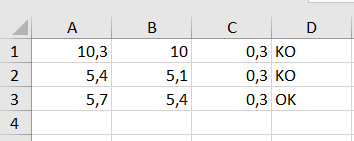


Using Excel for web, add the goosefoot to the formula at 0.3.
You have the formula D = IF (C1 = 0.3, "OK", "KO"),
add the formula as D = IF (C1 = "0.3", "OK", "KO") and the problem will be solved.
That is one of the reasons why at the beginning you always want to know which version of Excel and which operating system is the minimum.
In this way, you will receive a suitable proposal for a solution more quickly and we can help several users. Win-win for everyone.
Anyway, I hope this helped you.
If you are satisfied with this proposed solution, click this message as a correct answer or / with a like, this will also help others here in the forum.
Thank you
Nikolino
The more I know, the more I realize that I don't know anything.
(Albert Einstein freely based on Socrates)
- jop25Jul 23, 2021Copper Contributor
- NikolinoDEJul 23, 2021Platinum ContributorOK thx for the info 🙂
Works or works not now?
As I've always said, I never stop learning and mostly don't know anything.
Belong to the old school knows a lot of things, but nothing specific:)).
I would be happy to know if it helped you or not.
At your disposal for further questions,
I hope that I have not annoyed you with my comments.
Thx
NikolinoDE- jop25Jul 23, 2021Copper ContributorA-B is a number. Adding quotes in if function always gets false. It should be true (OK) all the time (in the exemple).